Call recording
Call recording
Record business calls automatically or on demand, review them from call history, and use them for training, quality review and AI call insights.
Call recording in phone.systems™ records inbound and outbound calls per user and direction or on demand, links each recording to its call in call history, and stores MP3 recordings in phone.systems™ or your own cloud storage.
Record the calls that matter
Automatic or on demand
Record every external call for a user, by direction, or start recording during a single call.
- Per user
- inbound or outbound
- On demand with a feature code
- Call Recorder step in a call flow
Review from call history
Each recording is linked to its call, next to the status, wait time, tags and notes.
- Play back from the call
- Tags and notes for context
- Attach to the CRM record with HubSpot
Turn recordings into insights
Send recordings to AI call insights for a transcript, summary, sentiment, key topics and scorecard-based scoring.
- Transcript and summary
- Sentiment and key topics
- $0.02 per recorded minute analysed
Control recording per user
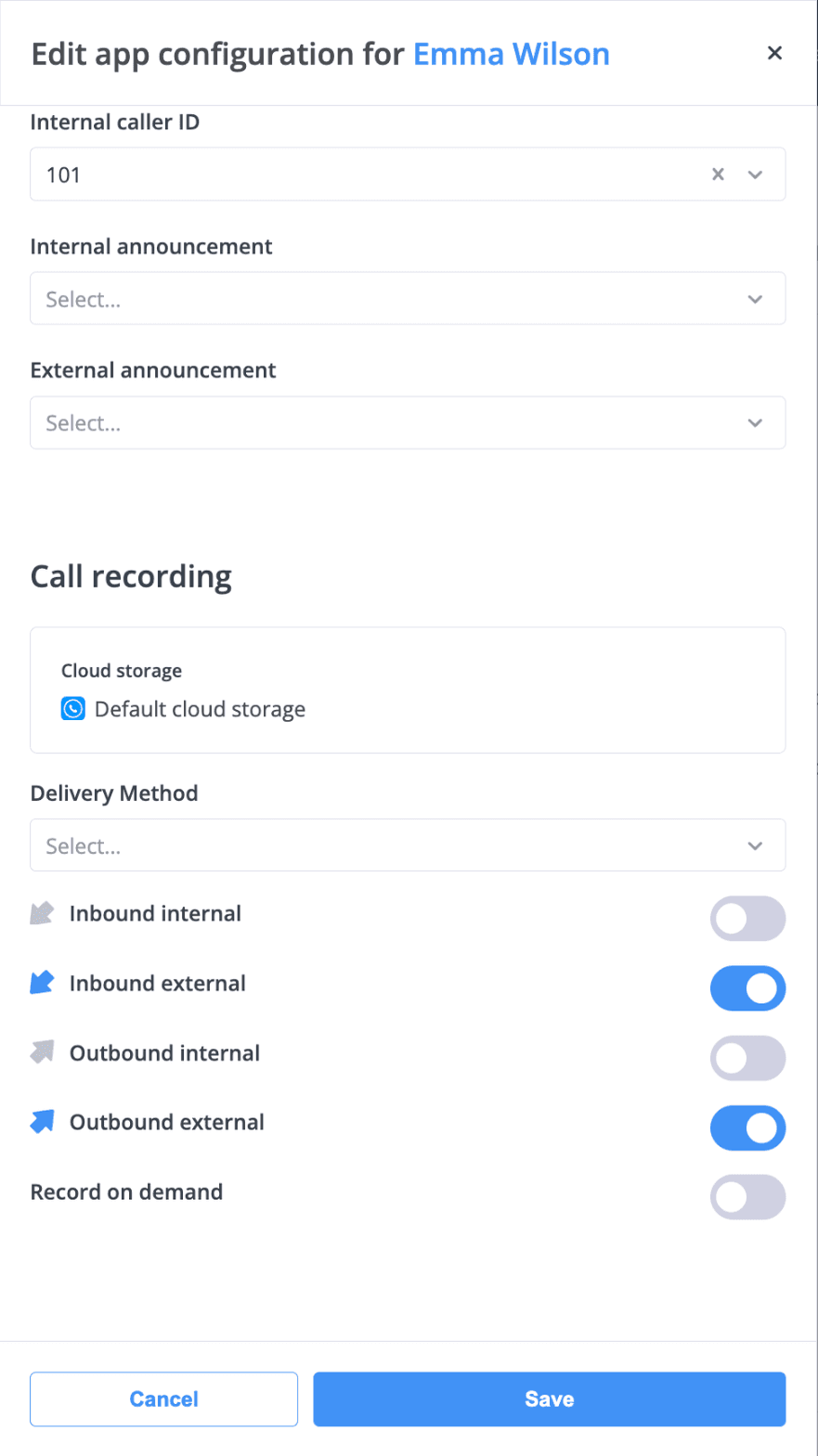
Turn recording on for inbound calls, outbound calls or both, and choose where the recordings go.
Recording settings per user: inbound and outbound external calls are recorded to the selected storage.
Why businesses record calls
Training
New team members learn from real calls.
Quality review
Managers check how calls are handled, with AI call scoring against a scorecard if needed.
Accurate records
When there is a disagreement about what was agreed, the recording shows it.
Keep recordings where your business needs them
Recordings are stored in phone.systems™ by default. If your policies require it, keep them in your own cloud storage instead, or deliver copies automatically to the tools your team already uses.
Recording storage and delivery
Show storage and delivery options
- phone.systems™ storage
- The default. Recordings are saved as MP3 files and linked to their calls in call history.
- Your own cloud storage
- AWS, Azure or an S3-compatible service such as MinIO.
- Delivery methods
- Send recordings and voicemails to email, Dropbox, Google Drive, OneDrive, FTP or SFTP. Delivery logs show each delivery with its status, time, file name and size.
- Call Recorder object
- Records calls from a chosen point in a call flow.
- Recording announcements
- Rules on informing callers differ between countries. An Audio Playback step at the start of a call flow can play an announcement.
What call recording covers
Call recording stores the audio of business calls so they can be reviewed later. phone.systems™ records calls as MP3 files, links each recording to its call in call history, and lets you decide where recordings are stored and delivered.
How recording works
- An administrator enables recording per user for inbound calls, outbound calls or both. Users can also start recording on demand with a feature code, and a Call Recorder object can record calls within a call flow.
- Recordings are saved to phone.systems™ storage or to your own cloud storage — AWS, Azure or S3-compatible such as MinIO.
- Delivery methods can send recordings to email, Dropbox, Google Drive, OneDrive, FTP or SFTP.
- If AI call insights are enabled, the recording gets a transcript, summary, sentiment, talk-to-listen ratio and key topics. With a CRM integration such as HubSpot, recordings can be attached to the customer record.
Where teams use it
Record calls when you need a reliable account of conversations — for training, quality review, or confirming what was agreed with a customer. Recording is often used by support teams and is the starting point for analyzing customer conversations.
Frequently asked questions
What is call recording?
Call recording is the storage of the audio of a phone call so it can be played back later.
Where are recordings stored?
In phone.systems™ storage by default, or in your own cloud storage on AWS, Azure or an S3-compatible service such as MinIO. Recordings are saved as MP3 files.
Can recordings be sent to other services?
Yes. Delivery methods send recordings and voicemails to email, Dropbox, Google Drive, OneDrive, FTP or SFTP.
Can I record only some calls?
Yes. Recording is set per user and per direction, inbound or outbound. Users can also record a single call on demand with a feature code.
Do I have to tell callers that calls are recorded?
Rules on informing callers differ between countries. Check the requirements that apply to your business; you can add an announcement with an Audio Playback object at the start of a call flow.
Set up a phone system that fits how you work
Configure numbers, users and call routing in one place, and change them whenever your business changes.