Business phone system
One business phone system for numbers, people, routing and calls
Business numbers, users, visual call flows, desktop and mobile apps and call history — managed in one account in your browser, from one seat.
phone.systems™ is a cloud business phone system (cloud PBX) that gives a company its phone numbers, users and extensions, visual call flows, calling apps, call recording and call history in one browser-based account.
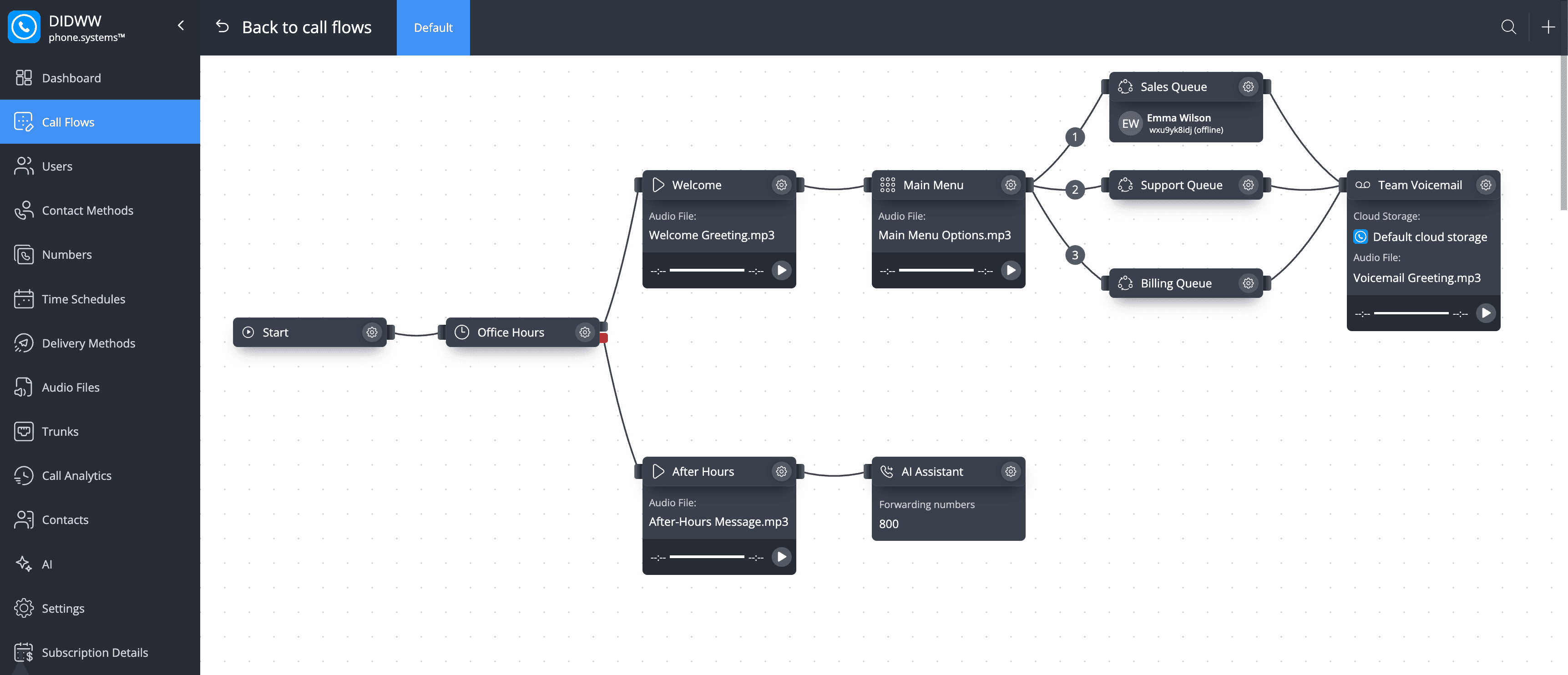
Everything a company phone line needs, in one place
Each part is set up in the same admin area and works with the others — no separate PBX, number provider or calling app to coordinate.
Set up business numbers and users
Get local, national, mobile or toll-free numbers, then give every user an extension, a department and a schedule.
- Numbers in 93 countries
- Free number porting in 42 countries
- Your own carrier with BYOC
Build call flows visually
Decide where every call goes on a canvas: by business hours, caller choice and who is available.
- Business hours and holidays
- Voice menus and queues
- Voicemail, forwarding and AI agent
Answer from desktop and mobile
Your team answers with the company's numbers in the phone.systems™ app, or on a desk phone.
- macOS, Windows and Linux
- iOS and Android
- SIP desk phones and softphones
Track and understand calls
See every call's outcome, follow up on missed calls, and add AI insights to recorded calls.
- Answered
- lost and resolved calls
- Call and agent statistics
- Recording and AI call insights
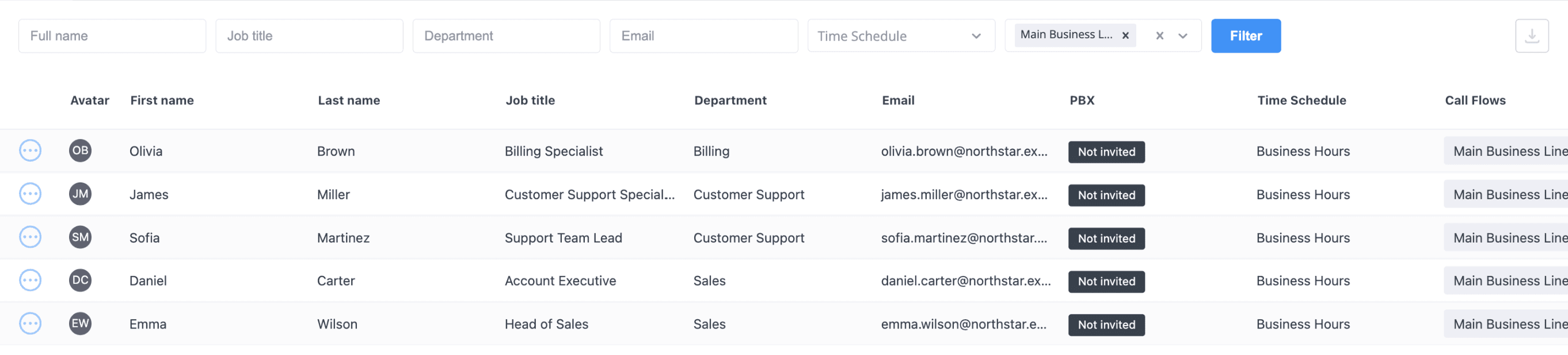
Manage users and departments in one place
Assign internal numbers, departments, schedules and calling methods to each user.
Users with their extensions, departments, schedules and call flows.
Pricing
One seat, one predictable price
From $9.99 per seat per month, month-to-month, from one seat. The price per seat falls as your team grows; phone numbers and outbound calls are billed by usage.
Each seat includes
- One user with the app on unlimited devices
- A SIP account for a desk phone or softphone
- A SIP and a PSTN forwarding destination
- 24/7 support
Everything in the account
The full set of building blocks behind the four areas above.
Show all features
- Phone numbers
- Numbers from phone.systems™ connectivity in 93 countries appear automatically. Add third-party numbers in E.164 format, or connect your own carrier.
- Users and extensions
- Each user has an internal number, job title, department and an optional time schedule.
- Contact methods
- Ring a user on the phone.systems™ app, a SIP account, SIP forwarding or PSTN forwarding to a mobile.
- Call flows
- A drag-and-drop editor with voice menus, ring groups, queues, time routers, voicemail, fax, conference and an AI agent.
- Company phonebook
- A shared company phonebook plus personal phonebooks. Import contacts from CSV with duplicate merging.
- Feature codes
- Attended and unattended transfer, call pickup and record on demand from the keypad.
- Calling apps and devices
- The app for macOS, Windows, Linux, iOS and Android, or any SIP softphone or IP phone.
- Call history and statistics
- Every call with wait time, talk time, status, tags and notes, plus call and user statistics.
- Recording and AI
- Record calls, store them in phone.systems™ or your own cloud storage, and add AI transcripts, summaries and scores.
Getting started
A guided onboarding wizard helps with the first setup.
Show setup steps
- 1. Create an account
- Sign up in the customer portal at my.didww.com, where phone.systems™ is managed.
- 2. Order or port a number
- Order a number in any of 93 countries, or port an existing one, and assign it to the phone.systems™ trunk.
- 3. Activate the subscription
- Choose the number of seats. From $9.99 per seat per month, less as you add seats.
- 4. Launch and build
- Open Cloud PBX System > Launch, add users and draw your first call flow.
What a business phone system is
A business phone system is the set of numbers, users and rules that a company uses to make and receive calls. phone.systems™ runs the whole system in the cloud: numbers, users, extensions, call flows, calling apps, call recording and call history are managed in one account, with phone numbers from the same platform.
How the parts connect
- Numbers are added to the account — local, national, mobile, toll-free, shared cost or UIFN in 93 countries, third-party numbers, or numbers from your own carrier.
- Users get an internal number and contact methods: the phone.systems™ app, a SIP account, SIP forwarding or PSTN forwarding.
- Time schedules define working days, hours and holidays, per company or per user.
- Each number is connected to a call flow that routes calls through voice menus, time routers, ring groups and queues.
- Team members answer in the app or on a SIP device. Every call appears in call history, and can be recorded and analysed with AI call insights.
Where it fits
A cloud business phone system fits companies that want one phone setup for the whole team without on-site hardware — a small business, a remote team or a business with several locations. For step-by-step setup, see how to set up phone.systems™; for a vendor-neutral checklist, read how to choose a business phone system.
Frequently asked questions
What is a business phone system?
A business phone system gives a company shared phone numbers, internal extensions and rules for where incoming calls go. A cloud business phone system runs these in an online service instead of on-site hardware.
Do I need desk phones to use phone.systems™?
No. Calls can be made and received in the phone.systems™ app on desktop and mobile. If you prefer desk phones, each seat includes a SIP account that works with any SIP IP phone or third-party softphone.
Can I keep my existing phone numbers?
Yes. Numbers can be ported free of charge in 42 countries plus UIFN. You can also add third-party numbers or connect your current carrier through BYOC.
Can calls ring on a mobile number?
Yes. PSTN forwarding sends calls to a mobile or other external number, and each seat includes one PSTN forwarding destination. Forwarded calls may incur per-minute charges.
Is phone.systems™ a contact center?
No. phone.systems™ is a business phone system for companies whose teams handle calls as part of their work.
Set up a phone system that fits how you work
Configure numbers, users and call routing in one place, and change them whenever your business changes.