Business phone app

Your company phone, on every device

Make and receive calls with your company numbers on macOS, Windows, Linux, iOS and Android — in the office, at home or on the road.

The phone.systems™ app is a calling app for macOS, Windows, Linux, iOS and Android that lets users make and receive calls with the company's phone numbers, see colleagues' presence and use the company directory.

One business identity across devices

Desktop and mobile

The same numbers, contacts and history wherever you answer

Every user gets the phone.systems™ app on unlimited devices. Calls ring with push notifications, go out with a company caller ID, and appear in the call history on each device.

  • macOS, Windows and Linux
  • iOS and Android
  • Unlimited devices per user
  • SIP desk phones and softphones also work

Built for working as a team

  • Use company caller ID

    Calls go out with the company's numbers. Choose which number customers see — for example a local number for each market.

    • Multiple caller IDs
    • Personal numbers stay private
    • Customers stay with the business
  • See who is free, then transfer

    Presence shows which colleagues are available, so a call reaches someone who can take it.

    • Teammate presence
    • Blind transfer from the app
    • Attended transfer and pickup by feature code
  • Customer context at hand

    The company directory and phonebooks are on every device, and the caller's CRM record is one tap away.

    • Company and personal phonebooks
    • Favorites
    • View in CRM
    See integrations

Available on every platform your team uses

Desktop
macOS, Windows and Linux apps
Mobile
iOS and Android apps with push notifications
1 seat
unlimited devices per user
SIP
desk phones and softphones, one SIP account per seat

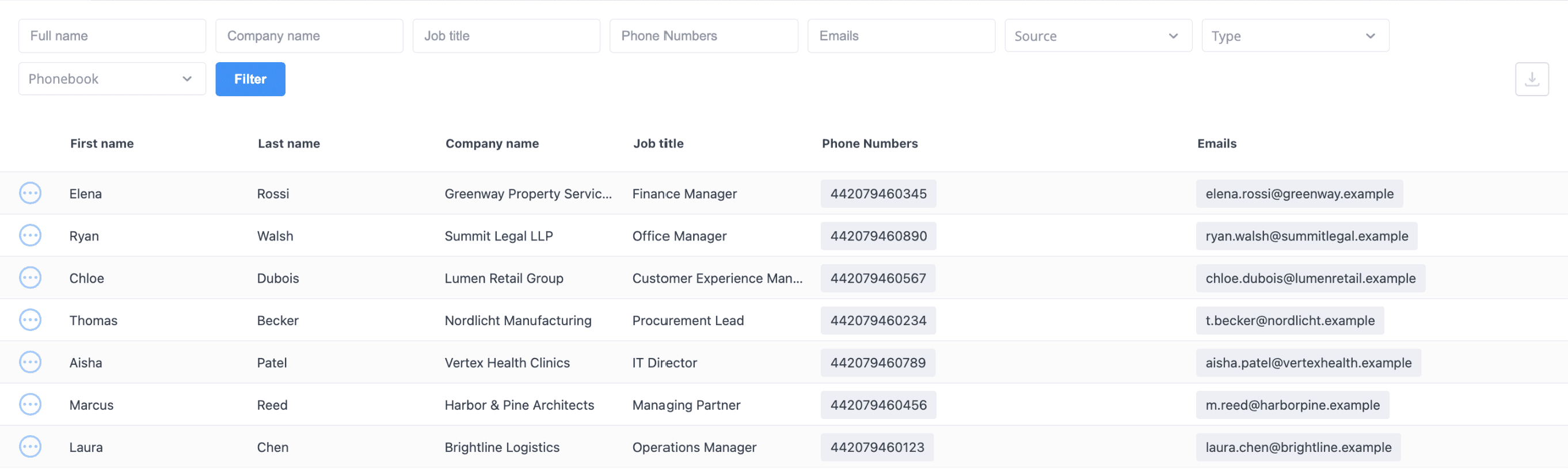
Shared company contacts

The company phonebook is managed once in the admin area and available to every user in the app.

Contacts can be typed as Lead or Customer and imported from CSV.

phone.systems™ company phonebook in the admin area listing customer contacts with company, job title, phone number and email

App and device details

Show technical details
Call controls
Mute, hold, DTMF and blind transfer during a call. Attended transfer and call pickup are available through feature codes.
Call history
Recent inbound, outbound and missed calls in the app; account-wide history and statistics in call analytics.
Encryption
Calls are encrypted with SRTP and TLS. Received faxes can also be viewed in the app.
SIP accounts
Each seat includes a SIP account for third-party SIP softphones or any SIP IP phone. Codecs: OPUS, G722, PCMU, PCMA, G729 and GSM. Transports: UDP, TCP, TLS and WSS, with SRTP encryption.
App languages
English, Ukrainian, Lithuanian, Latvian, German, Spanish and Portuguese.
Browser
Calls are made in the desktop or mobile app, or on a SIP device. The admin area for configuring the phone system runs in the browser.
The app behind every call

The phone.systems™ business phone app is where calls are answered and placed. It runs on macOS, Windows, Linux, iOS and Android, and uses the numbers, extensions and contacts configured in your business phone system account.

How calls reach the app

  1. A user signs in to the app on any number of devices.
  2. Calls routed to the user — directly, through a ring group or queue, or through a call flow — ring in the app. On mobile, push notifications deliver incoming calls.
  3. For outbound calls, the user picks which company number to show as caller ID.
  4. During a call, the user can mute, hold, send DTMF tones or blind-transfer to a colleague whose presence shows they are available.
  5. Calls appear in the user's history and in account-wide call history and statistics.

Where it fits

Use the app when staff work across the office, home and the road, or when they currently use personal phones for customer calls. It is central to remote teams and sales teams. For calls that should also reach a regular mobile number, add PSTN forwarding and send unanswered calls to mobile.

Frequently asked questions

Which devices does the phone.systems™ app support?

macOS, Windows and Linux on desktop, and iOS and Android on mobile. A seat covers one user with the app on unlimited devices.

Is there a web or browser version?

No. Calls are made in the desktop or mobile app, or on a SIP softphone or IP phone. The admin area for configuring the phone system runs in the browser.

Can I use my own desk phone or softphone?

Yes. Each seat includes a SIP account that works with any SIP IP phone or third-party SIP softphone.

Can I choose which number customers see when I call?

Yes. The app supports multiple caller IDs, so a user can choose which company number to show on an outbound call.

Which languages is the app available in?

English, Ukrainian, Lithuanian, Latvian, German, Spanish and Portuguese.

Set up a phone system that fits how you work

Configure numbers, users and call routing in one place, and change them whenever your business changes.

Request a demo