Use case
Analyze customer conversations
Record calls, get a transcript, summary and sentiment for each one, and score calls against the criteria your team agrees on.
The problem
Phone calls hold information that rarely reaches anyone else: why customers call, what they complain about, what convinced them to buy. Listening back to recordings takes as long as the call itself, so in practice almost nobody does it.
Team leads face a similar problem with coaching. They can review a handful of calls a week, and the feedback depends on which calls they happened to pick and how they judged them.
How phone.systems™ handles it
phone.systems™ combines three features.
- Call recording. Recording is turned on per user and per direction (inbound, outbound) in Contact Methods, placed in a call flow with a Call Recorder object, or started on demand with a feature code. Recordings are MP3 files, stored in phone.systems™ storage or your own AWS, Azure or S3-compatible storage, and can be delivered to email, Dropbox, Google Drive, OneDrive, FTP or SFTP.
- AI call insights. Recorded calls are processed into a transcript, a summary, sentiment, the talk-to-listen ratio and key topics. Insights are available in 19 languages and cost $0.02 per recorded call minute. You choose whether inbound, outbound or both directions are sent for processing.
- AI call scoring. You define scorecards with criteria, points and a target score, per call direction. The AI scores each call, explains its reasoning per criterion and suggests coaching points, and a dashboard shows results over time.
A support team might score inbound calls on greeting, understanding of the issue, resolution, empathy and next steps, while a sales team scores outbound discovery calls on a different set of criteria. With a CRM integration such as HubSpot, recordings and AI insights can also be pushed to the contact's timeline.
From conversation to insight
- Step 1: Call queuing: Call answered
A team member answers a call from the Support queue.
- Step 2: Call recording: Call recorded
Recording is on for the user and call direction; the MP3 is stored in phone.systems™ or your own cloud storage.
- Step 3: AI call insights
Transcript, summary, sentiment, talk-to-listen ratio and key topics.
- Step 4: AI call scoring
Optionally scored against a scorecard, with reasoning and coaching suggestions.
- Step 5: Review and follow-up
The team reviews the result and follows up; with a CRM integration such as HubSpot, the summary goes to the contact's timeline.
What you get for each recorded call
Transcript
The full conversation as text, searchable and quicker to scan than audio.
Summary
A short account of what the call was about and what was agreed.
Sentiment
An indication of how the conversation went for the customer.
Talk-to-listen ratio
How much of the call each side spoke.
Key topics
The main subjects discussed, useful for spotting recurring reasons for calls.
Scorecard results
Per-criterion scores, reasoning and coaching suggestions for scored calls.
How to set it up in phone.systems™
Turn on recording in Contact Methods
For each user's app configuration, enable inbound and/or outbound recording and choose the storage.
Set delivery and storage
In Delivery Methods and Settings, choose where recordings are kept and delivered.
Enable AI call insights
In the AI settings, choose which directions are sent for processing and the overview language.
Create scorecards
Define criteria, points per criterion, the target score and the call direction.
Follow scores over time
Use the AI Call Scoring dashboard to compare call scores with the target score over time.
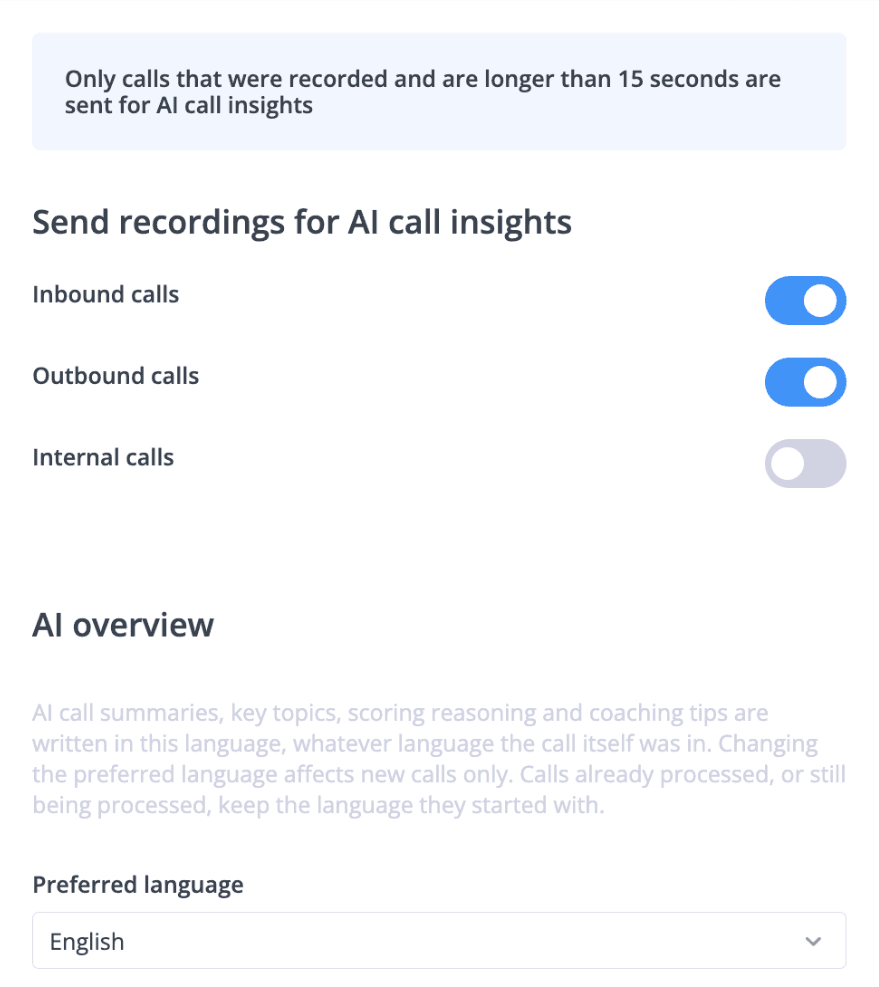
Choosing which calls are analysed
Configuration only: this screen decides which recordings are sent for AI processing.
AI settings: inbound and outbound recordings sent for AI call insights, overview language set to English.
Capabilities used
The phone.systems™ features this relies on. Each page explains how the capability works.
Call recording
Record calls per user and direction or on demand, review them from call history, analyse them with AI, and keep recordings in phone.systems™ or your own cloud storage.
Learn moreAI call insights
AI call insights for recorded calls: transcript, summary, sentiment, talk-to-listen ratio and key topics in 19 languages, plus AI call scoring. $0.02 per minute.
Learn moreCall analytics
Call history with wait time, talk time, status, tags and notes, routing attempts, CSV export, and call and user statistics (ACD, AWT, ASR) in phone.systems™.
Learn moreIntegrations
Native CRM integrations with HubSpot, Salesforce, Pipedrive, Zoho CRM, Zendesk and more, plus public webhooks, call journaling and Chrome click-to-call.
Learn more
Frequently asked questions
How much do AI call insights cost?
AI call insights cost $0.02 per recorded call minute, in addition to the seat price. See pricing.
Which languages are supported?
AI call insights support 19 languages.
Do I have to record every call?
No. Recording is set per user and per direction, can be placed in specific call flows with a Call Recorder object, or started on demand during a call with a feature code. Only recorded calls are analysed.
Where are recordings stored?
In phone.systems™ storage or in your own AWS, Azure or S3-compatible storage. Delivery Methods can also send recordings to email, Dropbox, Google Drive, OneDrive, FTP or SFTP.
Set up a phone system that fits how you work
Configure numbers, users and call routing in one place, and change them whenever your business changes.