Use case
Build an IVR phone menu
A Voice Menu object, a few text-to-speech prompts and a queue per option. No recording studio and no technical configuration.
The problem
Without a menu, every caller lands in the same place, and someone has to ask each one what they need and pass the call on. With a badly built menu, callers sit through long options, press the wrong key or end up in a loop with no way out.
Recording professional prompts is another obstacle: every change to a menu option means booking a voice artist or re-recording audio.
How phone.systems™ handles it
In phone.systems™ an IVR is a Voice Menu object in the visual call flow editor.
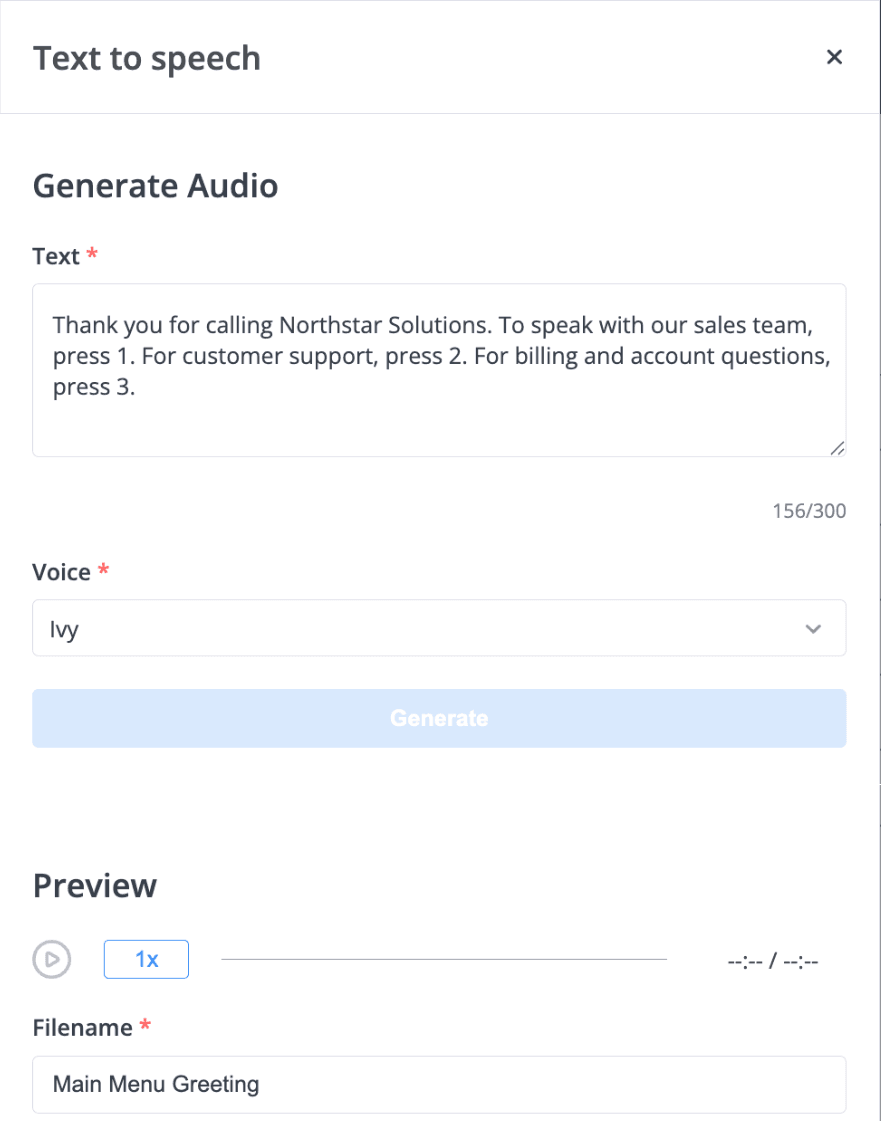
- Write the prompts. In Audio Files, type the menu text and generate it with text-to-speech (up to 250 characters per prompt), or upload or record audio in the browser. A simple business menu might say: "For sales, press 1. For support, press 2. For billing, press 3."
- Add the Voice Menu. Select the prompt, set how long to wait for a key (1 second to 2 minutes) and how many times to repeat the prompt (1 to 11).
- Connect the options. Draw a cable from each key to the next object: a Queue, a Ring Group, a person's Internal Number, an Audio Playback with information, Voicemail, Forwarding, or another Voice Menu for a sub-menu.
- Handle no input. Connect the timeout output so callers who press nothing still reach someone, such as the reception queue.
Put a Time Router in front of the menu to use it only during working hours, and a short Audio Playback welcome before it. Changes apply in real time, so updating an option takes a minute.
A simple business IVR
- Step 1: Time router: Office Hours
The menu is used during business hours.
- Step 2: Audio playback: Welcome
Text-to-speech welcome message.
- Step 3: Voice menu: Main Menu
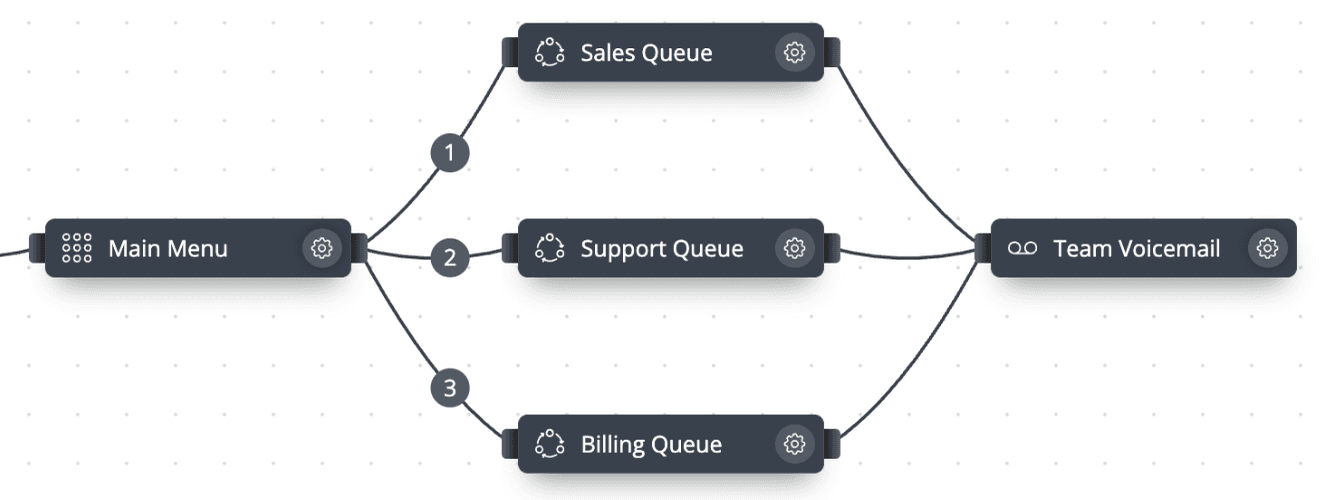
- Press 1: Sales queue
- Press 2: Support queue
- Press 3: Billing queue
- Step 4: Call queuing
- Timeout reached: Voicemail
The Voice Menu in the call flow editor
Each keypress option is a cable from the Voice Menu to a queue.
Menu prompts from text
Text-to-speech in Audio Files: type the prompt, choose a voice and preview the generated audio.
Voice Menu options
Three ways to create prompts
Upload an audio file (up to 14 MB), record in the browser, or generate with text-to-speech.
Timeout and repeats
Wait 1 second to 2 minutes for a key and repeat the prompt 1–11 times.
Any destination per key
Queue, Ring Group, Internal Number, Audio Playback, Voicemail, Forwarding, Conference or another Voice Menu.
Hold playlists
Playlists in Audio Files provide music or messages while callers wait in a queue.
Blocklist
Put a Blocklist object before the menu to reject known unwanted callers.
Routing attempts
Call History and Routing Attempts in Call Analytics help you check how calls were routed.
How to set it up in phone.systems™
Create prompts in Audio Files
Generate the welcome and menu prompts with text-to-speech, keeping each option short.
Create the destinations
In Call Flows, add the Queues or Ring Groups each option will reach, and a Voicemail fallback.
Add a Voice Menu
Select the menu prompt, set the timeout and number of repeats.
Cable each key
Connect keys 1, 2, 3 and so on to their destinations, and the timeout output to a default destination.
Assign the number
In Numbers, point the phone number at the call flow, then place a test call.
Capabilities used
The phone.systems™ features this relies on. Each page explains how the capability works.
Call routing
Build call flows in a drag-and-drop editor: voice menus, time routers, ring groups, queues, voicemail, caller routing and an AI agent. Changes apply in real time.
Learn moreBusiness phone system
phone.systems™ is a cloud business phone system: numbers in 93 countries, users and extensions, visual call flows, desktop and mobile apps, call history and recording.
Learn moreCall analytics
Call history with wait time, talk time, status, tags and notes, routing attempts, CSV export, and call and user statistics (ACD, AWT, ASR) in phone.systems™.
Learn more
Frequently asked questions
What is an IVR?
An IVR (interactive voice response) menu plays a recorded or generated prompt and routes the call based on the key the caller presses. In phone.systems™ this is the Voice Menu object.
Do I need to record the menu prompts myself?
No. Prompts can be generated from text with text-to-speech (up to 250 characters per prompt). You can also upload professional recordings or record in the browser.
Can I build sub-menus?
Yes. Connect a key to another Voice Menu to create a second level, for example product lines within Support.
How many options should an IVR have?
Keep the first level to three or four options and put the most common reason for calling first. Always connect the timeout output so callers who press nothing still reach someone.
Set up a phone system that fits how you work
Configure numbers, users and call routing in one place, and change them whenever your business changes.