Use case
Route calls between departments
Callers choose a department from a menu or dial its own number, each department answers from its own queue, and staff can pass calls on when needed.
The problem
When one person or one ring group answers every call, the receptionist becomes a switchboard. Sales enquiries wait behind invoice questions, support calls ring people who cannot help, and customers repeat themselves each time they are passed on.
Departments also have different needs: sales wants every new enquiry answered quickly, support needs calls spread evenly across the team, and billing may be one or two people who need a backup.
How phone.systems™ handles it
phone.systems™ routes calls to departments in three ways, which can be combined:
- A Voice Menu (IVR). The caller hears a prompt and presses a key, for example 1 for Sales, 2 for Support and 3 for Billing. Prompts can be uploaded, recorded in the browser or generated with text-to-speech.
- Dedicated department numbers. Each phone number can start its own call flow, so a support number can go straight to the Support queue without a menu. Numbers are available in 93 countries.
- Transfers between people. Staff can make a blind transfer from the phone.systems™ app, and feature codes provide attended and unattended transfer and call pickup.
Each department is a Queue with its own members and distribution strategy (round robin, ring all or random) and its own hold-message playlist. A person can belong to more than one queue, so a small billing team can have a backup from support. When a queue's timeout is reached, the call falls through to another team or a shared voicemail.
Call tags such as Support request or Billing question, and the per-queue data in Call Statistics, show how calls divide between departments.
Department routing with a voice menu
- Step 1: Voice menu: Main Menu
Text-to-speech prompt: press 1 for Sales, 2 for Support, 3 for Billing.
- Press 1: Sales queue
- Press 2: Support queue
- Press 3: Billing queue, with a backup member from Support
- Step 2: Call queuing: Department queue
Round robin distribution; each queue plays its own hold playlist.
- Answered: Agent can transfer to another department if needed
- Timeout reached: Team Voicemail
- Step 3: Call History
Tagged Support request, Billing question, New lead and so on.
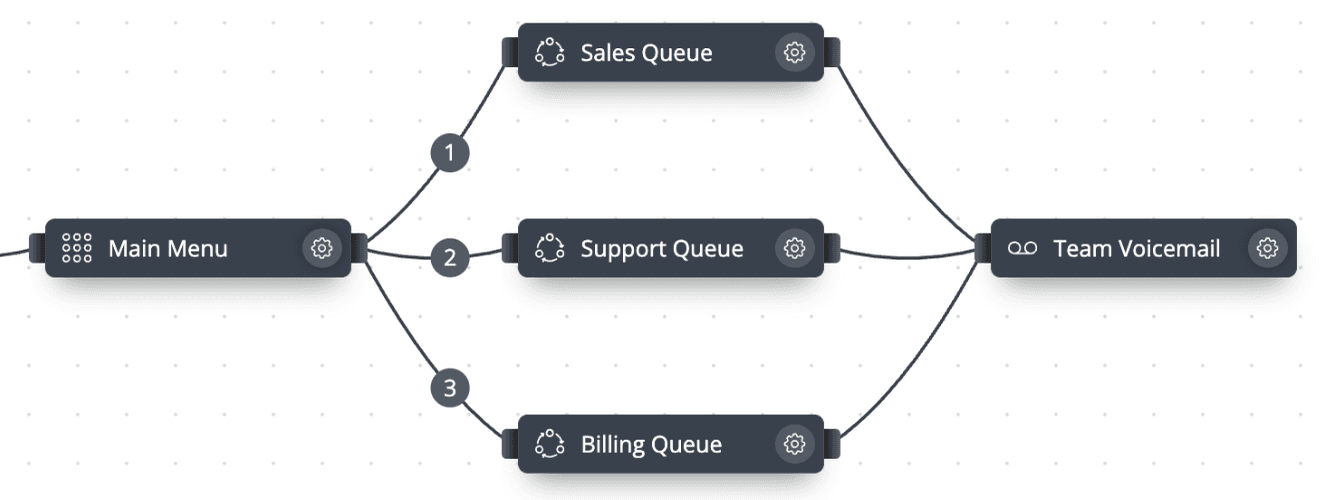
The menu and queues in the call flow editor
Main Menu: key 1 to Sales, 2 to Support, 3 to Billing; unanswered queue calls go to Team Voicemail.
What you can configure
Voice Menu options
Keypress options for each department, a timeout of 1 second to 2 minutes and 1–11 prompt repeats.
A queue per department
Its own members, distribution strategy, hold music and timeout.
Department numbers
Local, national, mobile or toll-free numbers that route straight to one department.
Transfers
Blind transfer in the app; attended and unattended transfer and call pickup with feature codes.
Shared directory
Company directory and presence in the app help staff see who is available before transferring.
Department reporting
Call tags, Call Statistics and User Statistics (ACD, AWT, ASR) per team.
How to set it up in phone.systems™
Add users with departments in Users
Set each person's department and job title, and invite them to the app.
Create prompts in Audio Files
Generate the menu prompt with text-to-speech and create a hold playlist per department.
Build the call flow in Call Flows
Add a Voice Menu, one Queue per department, and a Voicemail as the fallback for each queue.
Point numbers at the flow in Numbers
Assign the main number to the menu flow, and any department numbers to their own flows.
Create call tags
Add tags such as Support request and Billing question so calls can be grouped in Call History.
Capabilities used
The phone.systems™ features this relies on. Each page explains how the capability works.
Call routing
Build call flows in a drag-and-drop editor: voice menus, time routers, ring groups, queues, voicemail, caller routing and an AI agent. Changes apply in real time.
Learn moreBusiness phone app
The phone.systems™ app for macOS, Windows, Linux, iOS and Android: company caller IDs, directory, presence, transfers and encrypted calls on every device.
Learn moreCall analytics
Call history with wait time, talk time, status, tags and notes, routing attempts, CSV export, and call and user statistics (ACD, AWT, ASR) in phone.systems™.
Learn more
Frequently asked questions
Should I use a menu or separate numbers for each department?
Either works, and many businesses use both. A Voice Menu keeps one number on your website; separate numbers let customers reach a department directly and make it easy to see volume per department.
Can staff transfer a caller to another department?
Yes. The phone.systems™ app supports blind transfer, and feature codes provide attended and unattended transfer as well as call pickup.
What happens if a department does not answer?
When the department queue's timeout is reached, the call moves to the next object, such as a shared Voicemail, another queue or Forwarding to a mobile.
Can one person be in more than one department queue?
Yes. A user can be a member of several queues, for example Support and Billing, so a small team always has a backup.
Set up a phone system that fits how you work
Configure numbers, users and call routing in one place, and change them whenever your business changes.