Solution
A business phone system for remote teams
One set of company numbers for a team that works from home, the office and the road, answered in the same apps wherever people are.
Common challenges for remote and hybrid teams
When a team works from different places, the phone line is often the last thing that still assumes everyone is in the office:
- Desk phones stay in the office. Calls to the main number ring on a desk nobody is sitting at.
- Forwarding to personal numbers exposes staff numbers, and calls disappear from any company record.
- Nobody knows who is available. Colleagues cannot see whether someone is free before transferring a call.
- Working hours differ. Part-time staff and people in other time zones get calls outside their hours.
- No shared view of calls. Managers cannot see which calls were answered or lost across the team.
How phone.systems™ handles it
phone.systems™ runs the phone system in the cloud, so where someone works does not change how calls reach them:
- Apps on every platform The phone.systems™ app runs on macOS, Windows, Linux, iOS and Android. One seat covers one user on unlimited devices, so the same person can answer on a laptop at home and a phone on the road. Calls are encrypted with SRTP/TLS.
- One set of company numbers Everyone calls and answers with company numbers, and multiple caller IDs let each person choose which number to show. Numbers are available in 93 countries, which suits teams spread across borders.
- Presence and directory The app shows the company directory, colleagues' presence and favorites, so people can see who is available before a blind transfer.
- Schedules per user A time schedule can be assigned to each user, and Time Routers apply schedules in call flows, so each person's working hours are recorded in the system and call flows can route by the team's hours and time zone.
- Call routing without hardwareQueues and Ring Groups ring the team's apps; Forwarding can reach an external mobile; Voicemail catches the rest.
- One call history Every call, from any device or location, appears in Call History with Answered, Lost or Resolved status.
A typical remote team setup
- Step 1: Virtual number
Customer calls the company number.
- Step 2: Time router: Office Hours
- Open: Team queue
- Closed: Voicemail or AI agent
- Step 3: Call queuing
Rings team members' desktop and mobile apps, wherever they are working.
- Timeout reached: Forwarding to an on-call mobile, or Voicemail
- Step 4: Call History
The whole team's calls in one list.
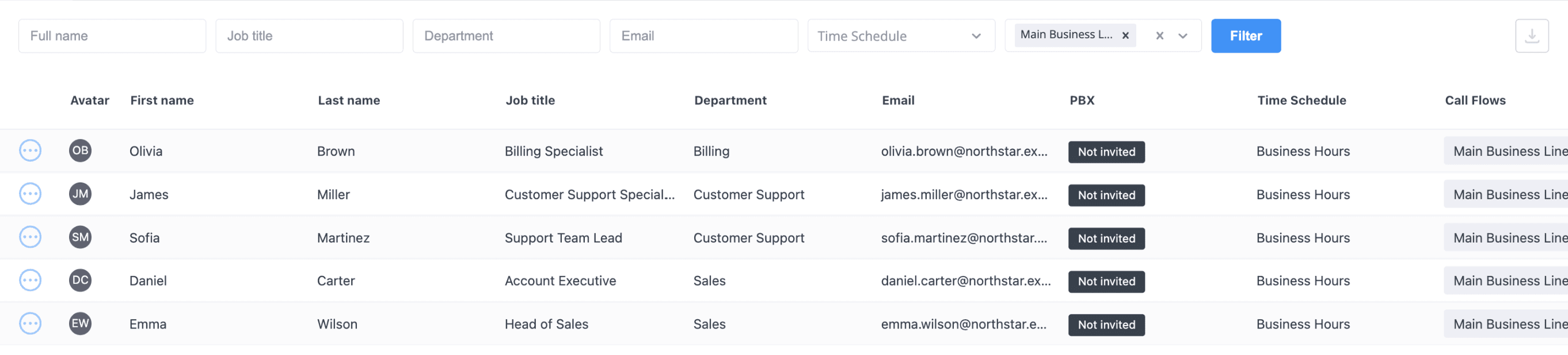
One directory for a distributed team
Users with job titles, departments and a time schedule each. Schedules can differ per person.
What remote teams use
Five platforms
macOS, Windows, Linux, iOS and Android; unlimited devices per seat.
Company caller IDs
Choose which company number to show; personal numbers stay private.
Presence
See colleagues' status in the company directory before transferring.
Schedules per user
Each user can have their own working hours and time zone.
Encrypted calls
SRTP/TLS encryption in the app; push notifications for incoming calls.
App languages
English, Ukrainian, Lithuanian, Latvian, German, Spanish and Portuguese.
Capabilities used
The phone.systems™ features this relies on. Each page explains how the capability works.
Business phone app
The phone.systems™ app for macOS, Windows, Linux, iOS and Android: company caller IDs, directory, presence, transfers and encrypted calls on every device.
Learn moreBusiness phone system
phone.systems™ is a cloud business phone system: numbers in 93 countries, users and extensions, visual call flows, desktop and mobile apps, call history and recording.
Learn moreCall routing
Build call flows in a drag-and-drop editor: voice menus, time routers, ring groups, queues, voicemail, caller routing and an AI agent. Changes apply in real time.
Learn moreCall analytics
Call history with wait time, talk time, status, tags and notes, routing attempts, CSV export, and call and user statistics (ACD, AWT, ASR) in phone.systems™.
Learn more
Frequently asked questions
Do remote staff need office equipment to take calls?
No. Staff install the phone.systems™ app on their computer (macOS, Windows or Linux) and phone (iOS or Android) and sign in. Desk phones are optional; any SIP IP phone can be connected if someone prefers one.
Is there a browser version of the app?
No. phone.systems™ uses native apps for desktop and mobile. Third-party SIP softphones can also be used with a SIP account.
Can managers see calls handled by remote staff?
Yes. All calls on the account appear in Call History, and User Statistics show figures per person, regardless of where they were working.
Can each person have different working hours?
Yes. Time schedules can be assigned per user, with their own time zone, working days and hours.
Set up a phone system that fits how you work
Configure numbers, users and call routing in one place, and change them whenever your business changes.