Use case
Route calls by business hours
A time schedule and a Time Router decide where each call goes, based on your working hours, time zone and holidays.
The problem
A business number that rings the same way at all times causes two problems. During opening hours it may work well, but in the evening, at weekends and on public holidays callers hear a phone that rings out, with no information about when to call back. The alternative, forwarding everything to someone's mobile, puts staff on call around the clock.
Opening hours also change. Holidays, a shorter day before Christmas or an office in another time zone all need a different rule, and changing a phone setup by hand each time is easy to forget.
How phone.systems™ handles it
In phone.systems™, business-hours routing is built from two parts.
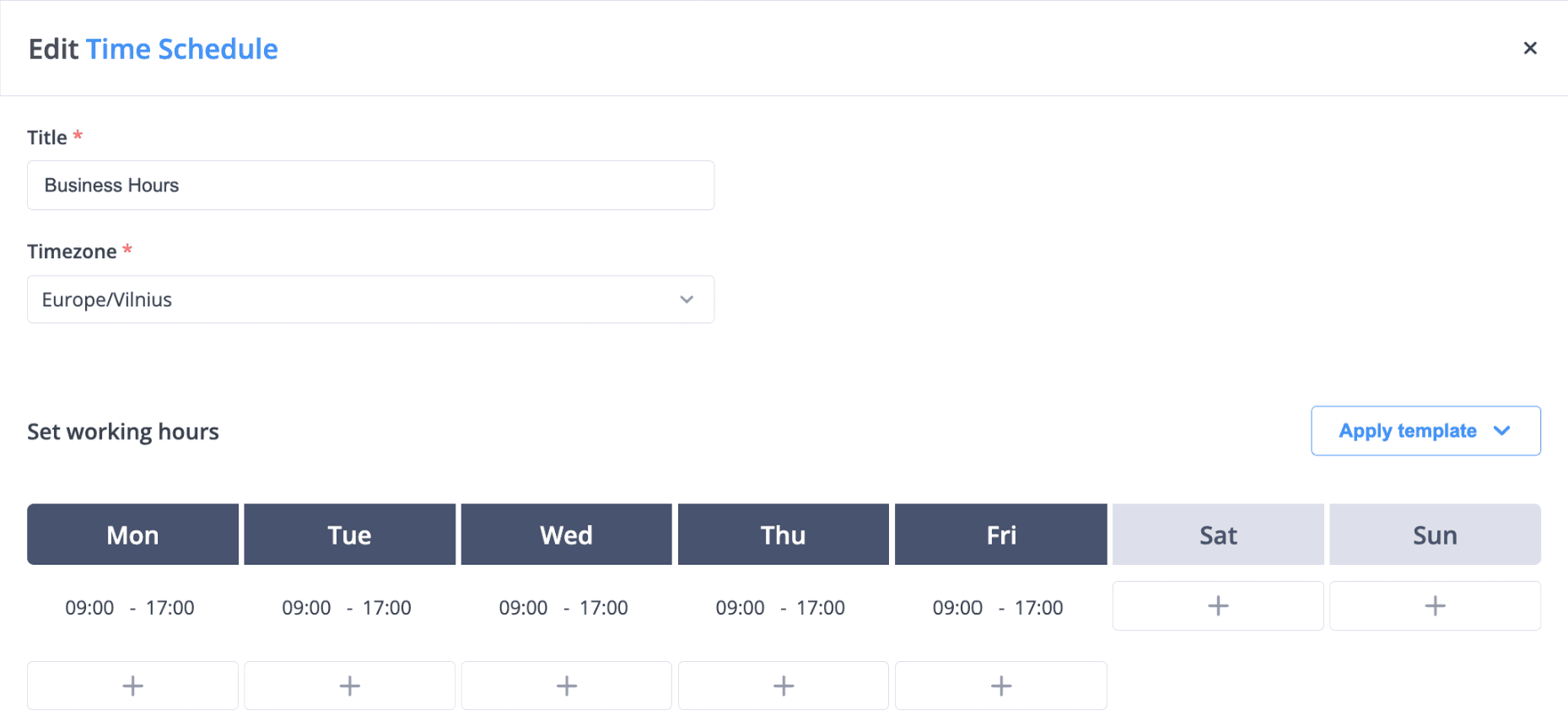
- A time schedule. In Time Schedules you set a time zone, working days and working hours, then add holiday exceptions that repeat once, monthly or yearly. A typical schedule is Monday to Friday, 09:00–17:00, closed on public holidays.
- A Time Router object in the call flow. The Time Router checks each call against the schedule and sends it out of one of two outputs:
- Open: the call continues to the objects that normally answer, such as a Voice Menu, Queue or Ring Group.
- Closed: the call follows a separate path, for example an Audio Playback message with your opening hours, a Voicemail, Forwarding to an on-call mobile, or an AI Agent.
Each phone number can point to its own call flow, and each call flow can use its own schedule, so a sales line, a support line and an office in another country can all keep different hours. Changes in the call flow editor apply in real time.
A business-hours call flow
During open hours calls reach your team; outside those hours they go to an announcement, voicemail, forwarding or an AI agent.
- Step 1: Virtual number
Your main business number.
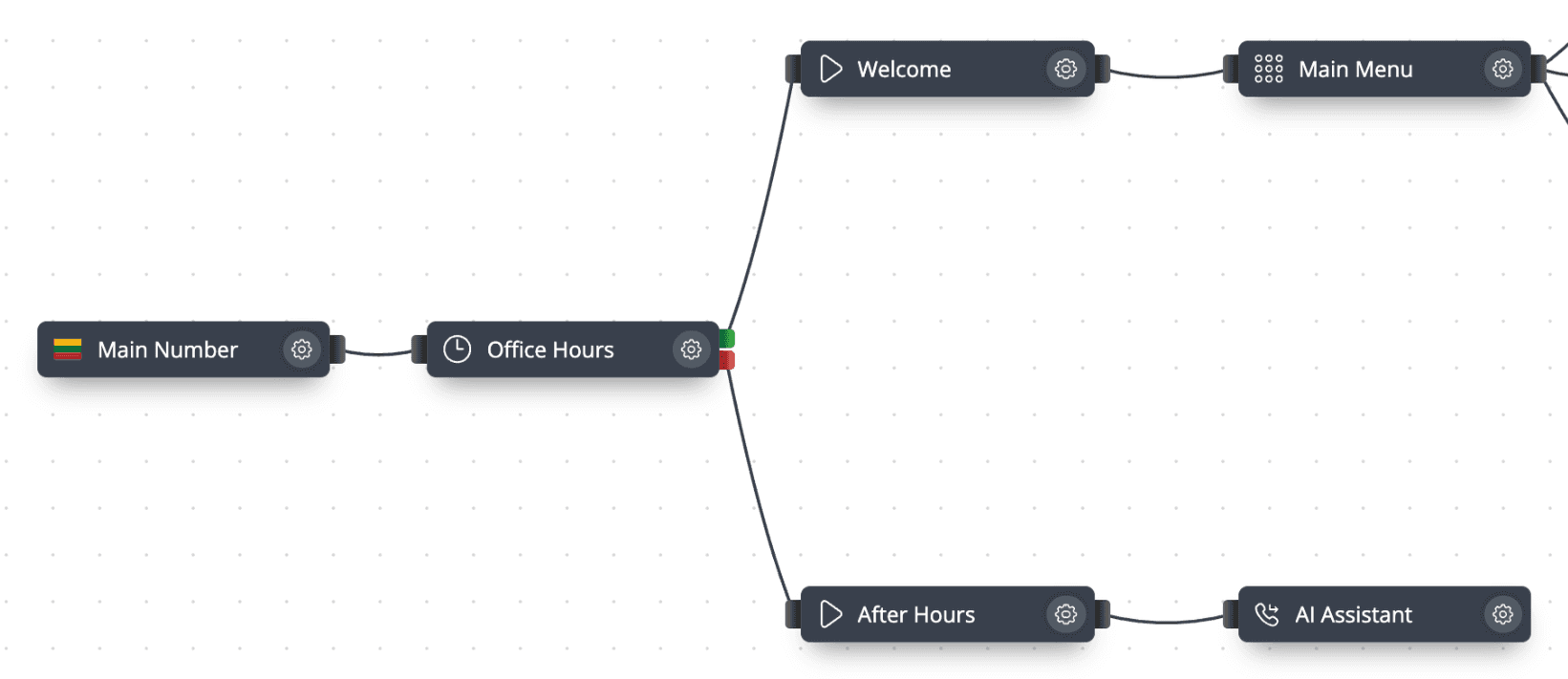
- Step 2: Time router: Office Hours
Working hours such as Monday–Friday 09:00–17:00, plus holiday exceptions.
- Open: Welcome message, then the Main Menu (1 Sales, 2 Support, 3 Billing)
- Closed: After-hours message, then voicemail, forwarding or an AI agent
- Step 3: Call History
Every call is logged with its status, wait time and talk time.
The Time Router in the call flow editor
Office Hours time router: the open output leads to the welcome message and IVR, the closed output to the after-hours message and AI agent.
The schedule behind it
A business-hours schedule with its time zone and working days. Holiday exceptions are added in the same form.
What you can configure
Time zone per schedule
Each schedule has its own time zone, so an office in another country is checked against its local time.
Holiday exceptions
Close for specific dates that repeat once, monthly or yearly, such as public holidays.
Any object on either branch
Connect the open and closed outputs to a Voice Menu, Queue, Ring Group, Voicemail, Forwarding or AI Agent.
Text-to-speech messages
Create the after-hours announcement in Audio Files from typed text, up to 250 characters per prompt.
Schedules per user
Assign a schedule to individual users as well as using it in a call flow.
Real-time changes
Edits in the call flow editor apply immediately, with no restart or deployment step.
How to set it up in phone.systems™
Create a schedule in Time Schedules
Set the time zone, working days and hours, then add holiday exceptions (once, monthly or yearly).
Prepare the messages in Audio Files
Upload, record in the browser or generate with text-to-speech a welcome message and an after-hours message.
Add a Time Router in Call Flows
Connect the Phone Number object to a Time Router and select your schedule.
Connect the open branch
Cable the open output to the Voice Menu, Queue or Ring Group that answers during working hours.
Connect the closed branch
Cable the closed output to an Audio Playback followed by Voicemail, Forwarding or an AI Agent.
Check the result in Call Analytics
Use Call History and Routing Attempts to confirm that calls took the expected path.
Capabilities used
The phone.systems™ features this relies on. Each page explains how the capability works.
Call routing
Build call flows in a drag-and-drop editor: voice menus, time routers, ring groups, queues, voicemail, caller routing and an AI agent. Changes apply in real time.
Learn moreBusiness phone system
phone.systems™ is a cloud business phone system: numbers in 93 countries, users and extensions, visual call flows, desktop and mobile apps, call history and recording.
Learn moreCall analytics
Call history with wait time, talk time, status, tags and notes, routing attempts, CSV export, and call and user statistics (ACD, AWT, ASR) in phone.systems™.
Learn more
Frequently asked questions
What is time-based call routing?
Time-based call routing sends a call to different destinations depending on when it arrives. In phone.systems™, a Time Router object compares the call time with a time schedule and sends the call to the open or closed branch of the call flow.
Can I close the line for public holidays?
Yes. Time schedules support holiday exceptions that recur once, monthly or yearly. On those dates the Time Router sends calls to the closed branch.
Can each number or office have different opening hours?
Yes. Each number can use its own call flow, and each Time Router can use its own schedule with its own time zone.
Can urgent callers still reach someone when we are closed?
Yes. Put a Voice Menu on the closed branch with an option that uses Forwarding to send urgent calls to an on-call mobile, and send everything else to Voicemail or an AI Agent.
Set up a phone system that fits how you work
Configure numbers, users and call routing in one place, and change them whenever your business changes.