Solution
A business phone system for sales teams
Route new enquiries to a rep quickly, call from the right company number, log every call to your CRM and review discovery calls against a scorecard.
Common challenges for sales teams
Sales teams depend on answering new enquiries quickly and keeping an accurate record of every conversation. Common problems are:
- Inbound leads wait A prospect calls the main number, sits in a general queue or reaches voicemail, and calls a competitor instead.
- Calls are missing from the CRM Reps forget to log calls, so the account history is incomplete and handovers lose context.
- Reps call from personal mobiles The customer sees a private number, and the relationship leaves with the rep.
- One number for every market Prospects in another country are less likely to answer an unfamiliar foreign number.
- Coaching is guesswork Managers hear a few calls a month and have no consistent way to judge them.
How phone.systems™ handles it
phone.systems™ gives sales teams a shared phone setup connected to the tools they already use:
- Routing for new enquiries A Voice Menu option or a dedicated sales number sends callers to a Sales Queue (round robin, ring all or random), with Voicemail or Forwarding to a mobile as the fallback.
- CRM call journaling Calls are logged automatically to native integrations with HubSpot, Salesforce, Pipedrive, Zoho CRM, Zendesk, monday CRM, ActiveCampaign, Odoo, Freshsales, Copper and Attio, and public webhooks send call events to other systems. With HubSpot, calls appear on the contact timeline, unknown callers can be created as contacts, and recordings and AI insights can be attached. Reps open the contact from the app with View in CRM, and the Chrome extension adds click-to-call.
- Multiple caller IDs Reps choose which company number the customer sees, for example a local number for each market. Numbers are available in 93 countries.
- Lost-call trackingCall History marks unanswered calls as Lost; tags such as New lead, Demo booked and Follow-up needed and notes keep follow-up organised.
- AI call scoring Define a scorecard, such as a Sales Discovery Call scorecard with four criteria, and the AI scores recorded outbound calls with reasoning and coaching suggestions. AI call insights add a transcript, summary and key topics for $0.02 per recorded minute.
A sales line from first ring to CRM record
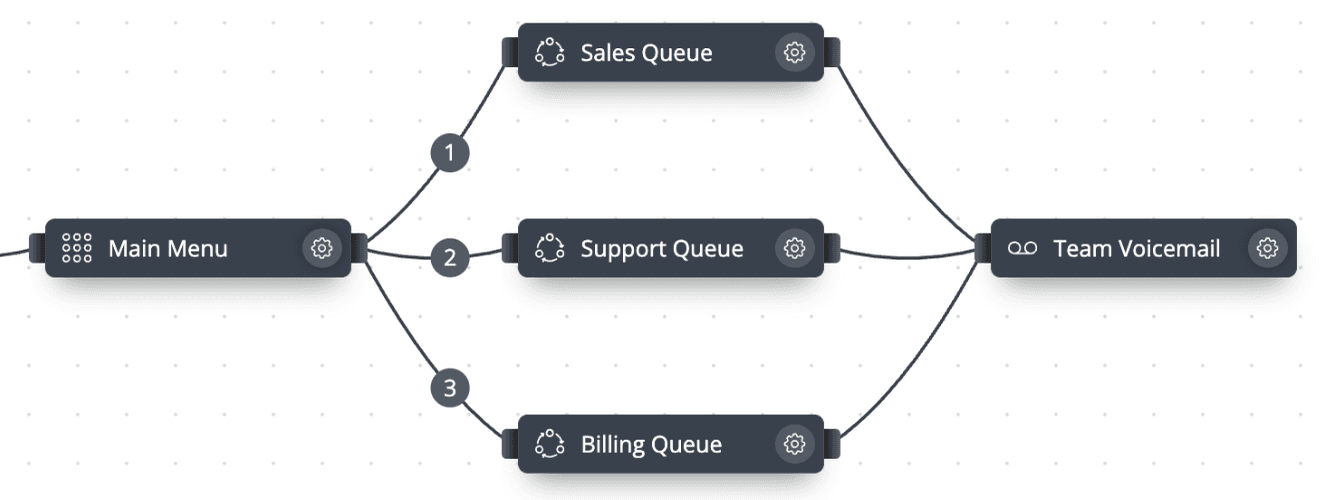
- Step 1: Voice menu: Main Menu
The caller presses 1 for Sales, or dials a dedicated sales number.
- Step 2: Call queuing: Sales queue
Calls are distributed across available reps by round robin, ring all or random.
- Answered: Rep opens the contact with View in CRM
- Timeout reached: Voicemail or a mobile fallback; the call shows as Lost
- Step 3: Call logged to the CRM
Call journaling adds the call to the contact's record.
- Step 4: Tagged and scored
Tag the outcome, such as New lead or Demo booked, and review recorded calls with AI scorecards.
Sales routing in the call flow editor
A voice menu option routes prospects to the Sales queue, with Support, Billing and a voicemail fallback alongside.
Native CRM integrations
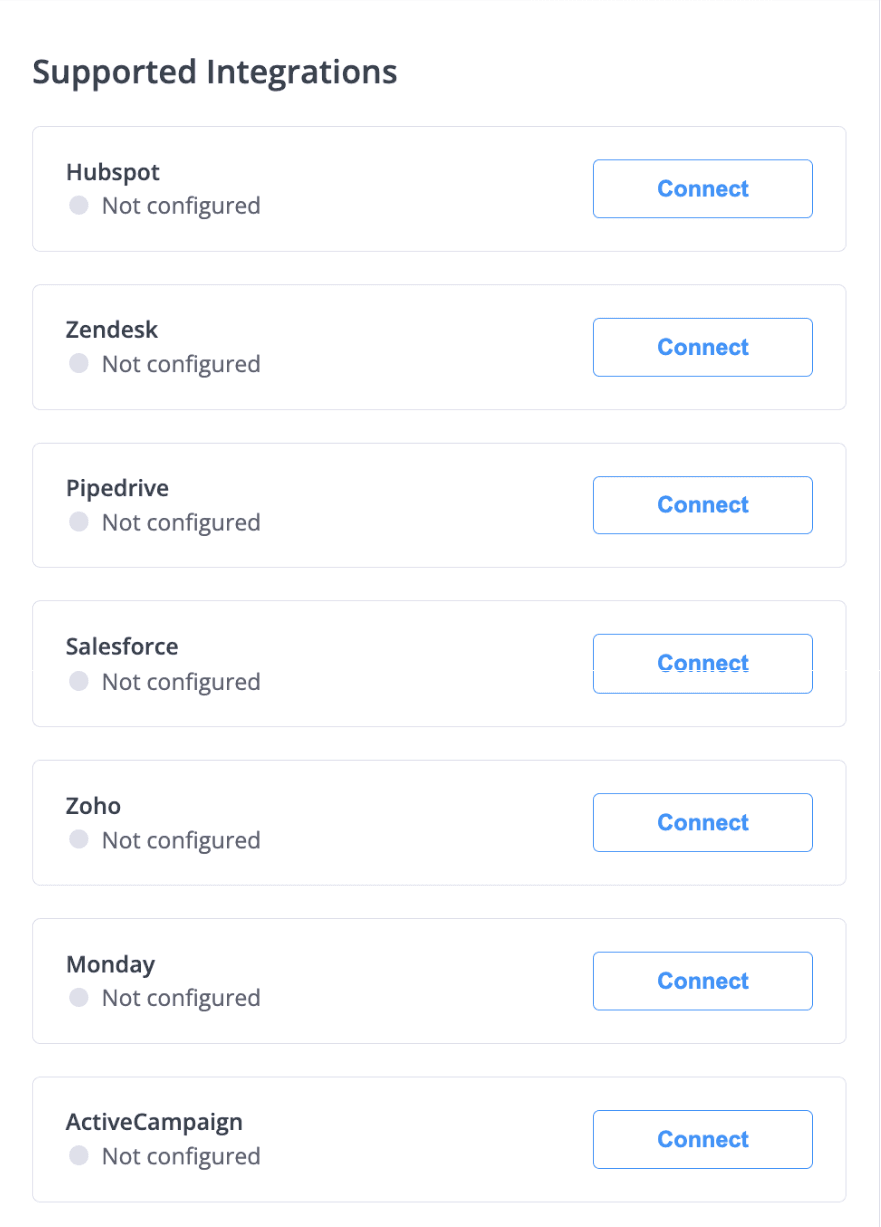
CRM integrations are connected in Settings. Public webhooks cover systems without a native integration.
What sales teams use
CRM call journaling
Calls logged to major CRM platforms, including HubSpot, Salesforce, Pipedrive and Zoho CRM.
Multiple caller IDs
Choose which company number to show on each outgoing call.
Click-to-call
Chrome extension and tel:/callto: links start calls in the app.
Lost-call tracking
Lost and Resolved statuses, resolved-by, tags and notes in Call History.
AI call scoring
Scorecards with criteria, points and a target score; AI reasoning and coaching suggestions.
Call statistics
User Statistics with ACD, AWT and ASR for each rep.
Capabilities used
The phone.systems™ features this relies on. Each page explains how the capability works.
Integrations
Native CRM integrations with HubSpot, Salesforce, Pipedrive, Zoho CRM, Zendesk and more, plus public webhooks, call journaling and Chrome click-to-call.
Learn moreBusiness phone app
The phone.systems™ app for macOS, Windows, Linux, iOS and Android: company caller IDs, directory, presence, transfers and encrypted calls on every device.
Learn moreCall routing
Build call flows in a drag-and-drop editor: voice menus, time routers, ring groups, queues, voicemail, caller routing and an AI agent. Changes apply in real time.
Learn moreCall analytics
Call history with wait time, talk time, status, tags and notes, routing attempts, CSV export, and call and user statistics (ACD, AWT, ASR) in phone.systems™.
Learn moreAI call insights
AI call insights for recorded calls: transcript, summary, sentiment, talk-to-listen ratio and key topics in 19 languages, plus AI call scoring. $0.02 per minute.
Learn more
Frequently asked questions
Which CRMs does phone.systems™ integrate with?
HubSpot, Salesforce, Pipedrive, Zoho CRM, Zendesk, monday CRM, ActiveCampaign, Odoo, Freshsales, Copper and Attio. Other systems can receive call data through public webhooks.
Can reps choose which number the customer sees?
Yes. The phone.systems™ app supports multiple caller IDs, so a rep can call a German prospect from a German number and a UK prospect from a UK number, provided both numbers are on the account.
Does phone.systems™ include a power or predictive dialer?
No. phone.systems™ is a business phone system with click-to-call from the app, the Chrome extension and tel: links. It does not include automated dialers.
How does AI call scoring work for sales calls?
You create a scorecard for a call direction, for example outbound, with criteria and points. A discovery-call scorecard might check the opening, needs analysis, product fit and agreed next step, with a target score. The AI scores each recorded call and explains its reasoning with coaching suggestions.
Set up a phone system that fits how you work
Configure numbers, users and call routing in one place, and change them whenever your business changes.