Solution
A business phone system for multi-location businesses
Local numbers, local opening hours and local teams for each office, managed from one account with one call history.
Common challenges for businesses with several locations
Businesses with several offices, stores or country teams often end up with a different phone setup at each site:
- Each location is managed separately, with its own provider, hardware and routing rules, and changes need someone on site.
- Customers need local numbers. A foreign or distant number is less likely to be called or answered.
- Opening hours and holidays differ by location and time zone, but calls are handled the same way everywhere.
- No overflow between sites. When one office is busy or closed, calls are lost even if another office could answer.
- No combined view of how calls are handled across locations.
How phone.systems™ handles it
phone.systems™ brings every location into one cloud business phone system, with DIDWW as the carrier behind it:
- Local numbers in 93 countries Local, national, mobile, toll-free, shared cost and UIFN numbers from DIDWW, which holds telecom licences in 30 countries. Number porting is free in 42 countries.
- A call flow per location Each number starts its own call flow in the visual editor, so every office can have its own greeting, Voice Menu, Queues or Ring Groups.
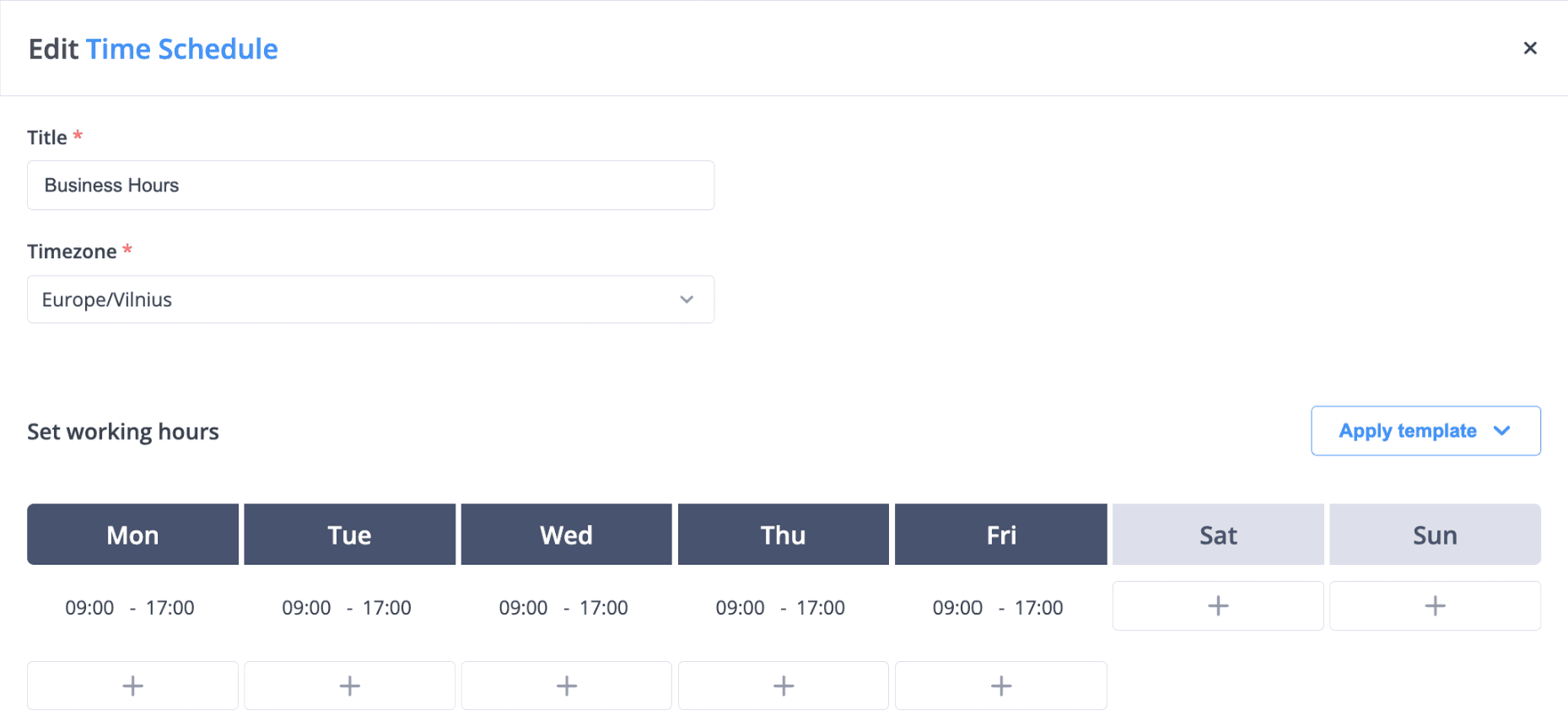
- Local hours and holidays Each Time Router uses a time schedule with its own time zone, working hours and holiday exceptions.
- Overflow between offices When a local queue reaches its timeout, the call can continue to another office, a central team, Voicemail or an AI Agent.
- Keep local carriers with BYOC Add inbound trunks and termination routes for carriers you already use, alongside DIDWW numbers.
- One directory and one call history Staff in every office share the company directory and presence in the apps, and Call History, Call Statistics and User Statistics cover all locations.
- Local caller IDs With multiple caller IDs, staff call customers from their own office's number.
For example, Markit uses phone.systems™ to handle cross-border communications for more than 50 markets (read the Markit case study).
A typical per-office setup
Repeated for each office with its own number, schedule and team.
- Step 1: Virtual number
A local number in the office's country.
- Step 2: Time router: local hours
Office time zone, working hours and public holidays.
- Open: Local team queue
- Closed: Another office that is open, Voicemail or an AI agent
- Step 3: Call queuing: Local team queue
- Timeout reached: Central team or another office
- Step 4: One call history
All offices in Call History and Call Statistics.
Each office on its own schedule
A business-hours schedule for one office. Each location gets its own schedule with its own time zone and holidays.
What multi-location businesses use
Numbers in 93 countries
Local, national, mobile, toll-free, shared cost and UIFN numbers from DIDWW.
Free number porting
Bring existing numbers to DIDWW in 42 countries plus UIFN.
Per-office call flows
Separate flows per number, organised in workspace tabs.
Per-office schedules
Time zone, hours and holiday exceptions for each location.
BYOC
Inbound trunks with their own SIP domain, termination routes and caller ID rewrite rules.
Volume pricing
Every seat gets cheaper as you add locations: down to $4.99 per seat from 200 seats, with custom options.
Capabilities used
The phone.systems™ features this relies on. Each page explains how the capability works.
Business phone system
phone.systems™ is a cloud business phone system: numbers in 93 countries, users and extensions, visual call flows, desktop and mobile apps, call history and recording.
Learn moreCall routing
Build call flows in a drag-and-drop editor: voice menus, time routers, ring groups, queues, voicemail, caller routing and an AI agent. Changes apply in real time.
Learn moreBYOC
Keep your carrier with phone.systems™: connect your own SIP carrier, use numbers in 93 countries, or combine both — with the same call flows, apps and call history.
Learn moreCall analytics
Call history with wait time, talk time, status, tags and notes, routing attempts, CSV export, and call and user statistics (ACD, AWT, ASR) in phone.systems™.
Learn more
Frequently asked questions
Can each location have its own phone number?
Yes. DIDWW provides local, national, mobile and toll-free numbers in 93 countries, and each number can use its own call flow and schedule.
Can locations use different carriers?
Yes. With bring your own carrier (BYOC), a location can use numbers and routes from its own SIP carrier while other locations use DIDWW numbers.
Can calls move to another office when one is busy or closed?
Yes. Connect a queue's timeout output or a Time Router's closed output to another office's queue or ring group.
Is there pricing for larger multi-site deployments?
Yes. The price of every seat drops as you add seats, down to $4.99 from 200 seats, where custom options are available. See pricing or contact sales.
Set up a phone system that fits how you work
Configure numbers, users and call routing in one place, and change them whenever your business changes.