Use case
Handle after-hours calls
Give every caller a clear next step when your office is closed, without asking staff to answer the phone at night.
The problem
Calls do not stop at 17:00. Customers in other time zones, people calling on a public holiday and urgent requests at the weekend all reach a closed office. If the line simply rings out, the caller does not know whether anyone will call back, and a genuine emergency may go unnoticed until the next working day.
Most businesses need a mix of responses: basic information for everyone, a way to leave a message, and a route to a person for the few calls that cannot wait.
How phone.systems™ handles it
In phone.systems™ the closed branch of a Time Router is an ordinary call flow, so you can combine the objects you need:
- Audio Playback plays a message with your opening hours. You can write it as text and generate it with text-to-speech in Audio Files.
- Voicemail records a message. A Delivery Method can send voicemail files to email, Dropbox, Google Drive, OneDrive, FTP or SFTP.
- Voice Menu lets callers choose, for example "press 1 for an urgent technical issue", with that option going to Forwarding to an on-call mobile over PSTN or to a SIP destination.
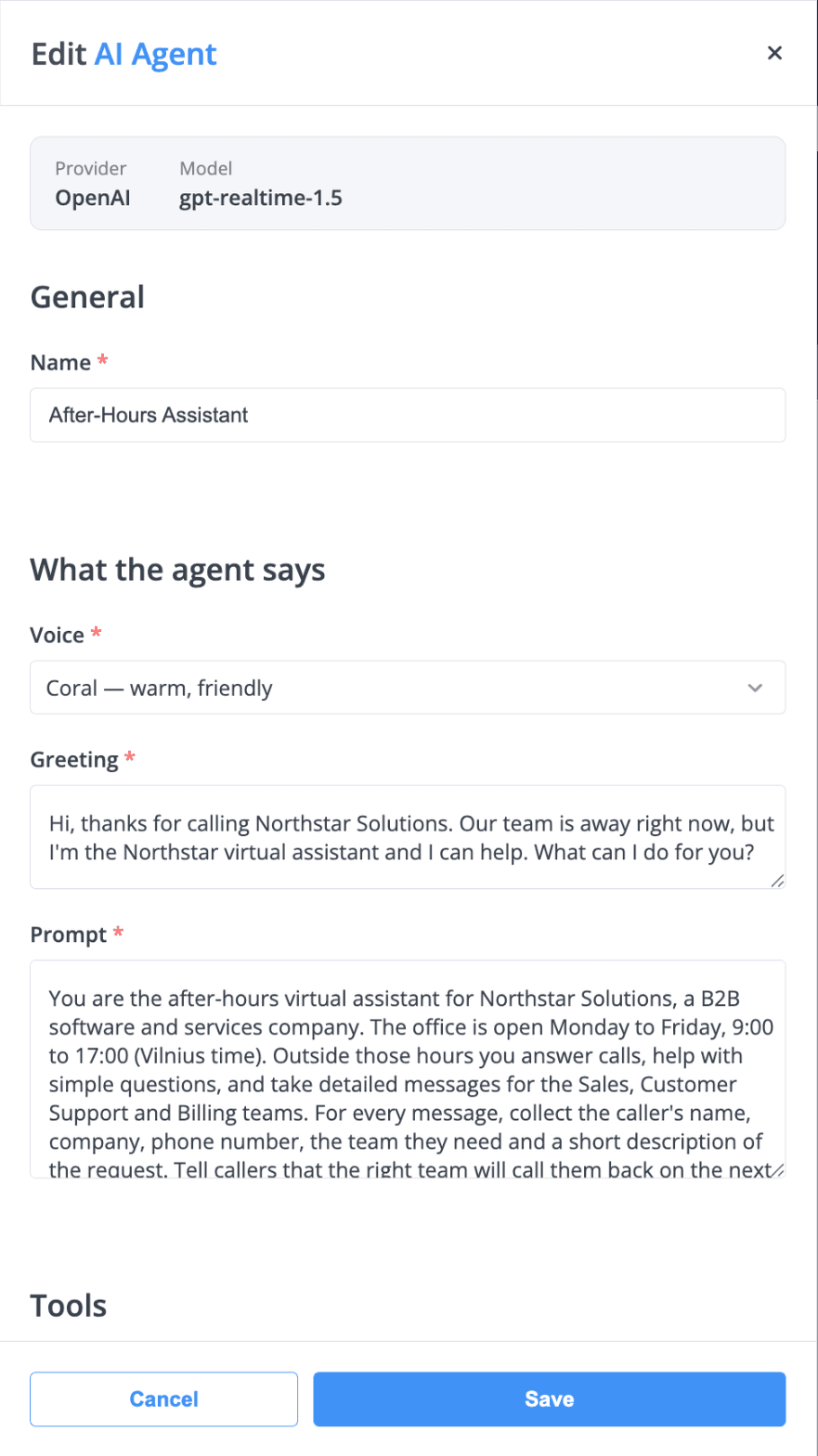
- AI Agent answers the call with a greeting and instructions you write, handles simple questions and takes a message.
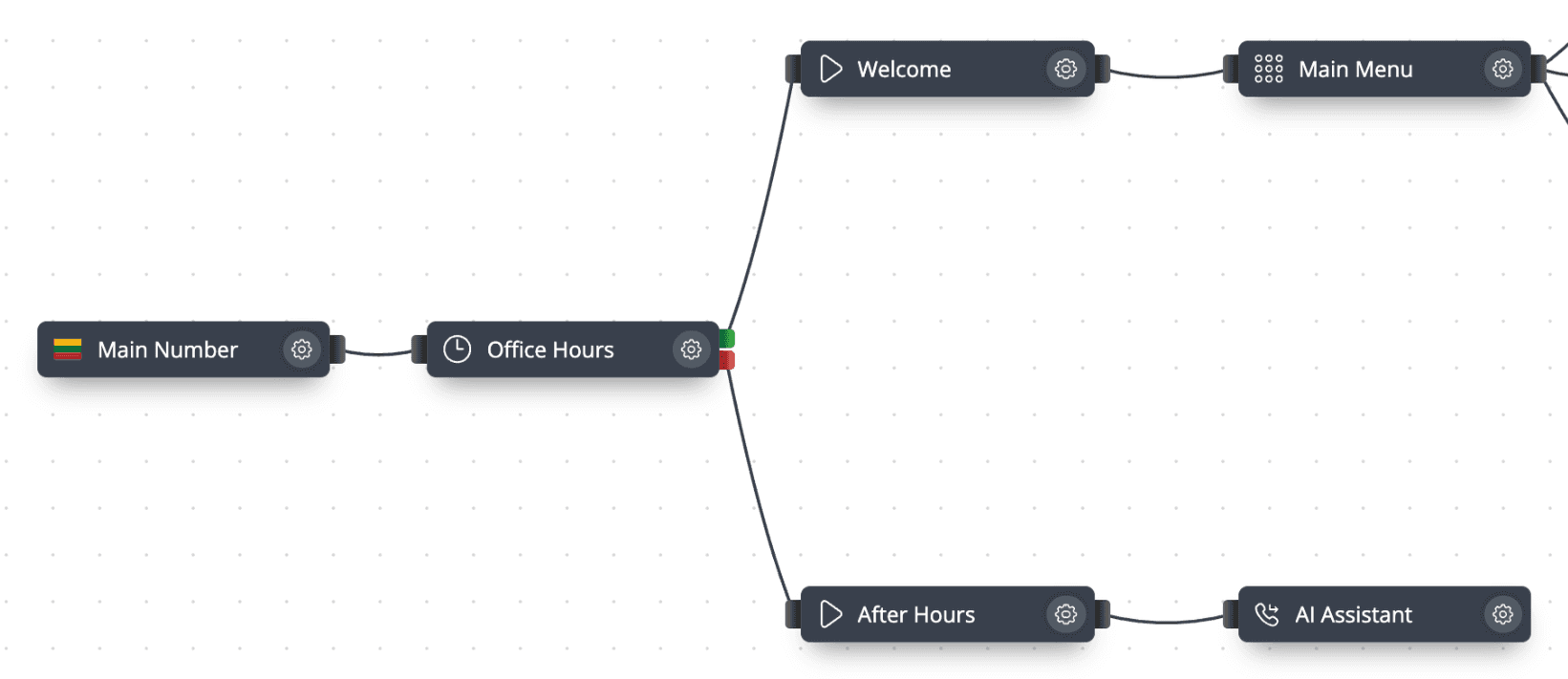
When the office is closed, the Time Router moves calls to this after-hours path: play an opening-hours message, take voicemail, forward urgent calls to an on-call number, or route calls to an AI agent. Every after-hours call is listed in Call History, so the team can see the next morning who called and follow up.
An after-hours path
- Step 1: Virtual number
A call to your main business number.
- Step 2: Time router: Office Hours
- Open: Welcome message and Main Menu
- Closed (evenings, weekends, holidays): After Hours message
- Step 3: Audio playback: After Hours
States opening hours; generated with text-to-speech.
- Step 4: AI Agent
Greets the caller, answers simple questions and takes a message.
- Step 5: Call History
The team reviews after-hours calls the next morning.
The open and closed branches
The closed branch of a Time Router: an after-hours message, then an AI agent.
The AI agent on the closed branch
AI agent configuration: name, voice, greeting and instructions for taking messages.
Options for the closed branch
Opening-hours message
Audio Playback with a prompt uploaded, recorded in the browser or generated from text (up to 250 characters).
Voicemail with delivery
Voicemail records a message; Delivery Methods send the file to email, cloud storage, FTP or SFTP.
Urgent line to an on-call mobile
A Voice Menu option connected to Forwarding reaches an on-call person on a mobile or external number.
AI agent
An AI Agent object answers with your greeting and instructions and takes a message.
How to set it up in phone.systems™
Define your hours in Time Schedules
Set working days, hours, time zone and holiday exceptions.
Create the announcement in Audio Files
Type the after-hours text and generate it with text-to-speech, or upload a recording.
Add forwarding targets in Contact Methods
If you want an urgent option, add a PSTN forwarding destination for the on-call mobile.
Build the closed branch in Call Flows
After the Time Router's closed output, add Audio Playback and then Voicemail, a Voice Menu with Forwarding, or an AI Agent.
Send voicemails somewhere useful
In Delivery Methods, choose where voicemail files go, for example a shared email address.
Review in Call Analytics
Filter Call History by time to see after-hours calls and mark them Resolved once handled.
Capabilities used
The phone.systems™ features this relies on. Each page explains how the capability works.
Call routing
Build call flows in a drag-and-drop editor: voice menus, time routers, ring groups, queues, voicemail, caller routing and an AI agent. Changes apply in real time.
Learn moreCall analytics
Call history with wait time, talk time, status, tags and notes, routing attempts, CSV export, and call and user statistics (ACD, AWT, ASR) in phone.systems™.
Learn moreBusiness phone app
The phone.systems™ app for macOS, Windows, Linux, iOS and Android: company caller IDs, directory, presence, transfers and encrypted calls on every device.
Learn more
Frequently asked questions
What is the simplest after-hours setup?
A Time Router whose closed branch plays an Audio Playback message with your opening hours and then goes to Voicemail. It takes a few minutes to build in the call flow editor.
Can urgent after-hours calls reach a person?
Yes. Add a Voice Menu on the closed branch with an urgent option connected to Forwarding. PSTN forwarding sends the call to a mobile or external number; per-minute charges may apply.
Are voicemails transcribed?
No. Voicemails are delivered as audio files through Delivery Methods such as email, Dropbox, Google Drive, OneDrive, FTP or SFTP.
Can an AI agent answer after hours instead of voicemail?
Yes. Place an AI Agent object on the closed branch. See the page on letting AI answer after hours for how it is configured.
Set up a phone system that fits how you work
Configure numbers, users and call routing in one place, and change them whenever your business changes.