Solution
A business phone system for support teams
Queue and distribute customer calls, follow up on every lost call, and review conversations with AI summaries and a quality scorecard.
Common challenges for customer support teams
Support teams handle calls from customers who need help now. Common problems are:
- Calls land in the wrong place Billing questions reach technical staff and the other way round, so customers are transferred and repeat themselves.
- Calls are unevenly distributed Some team members take most of the calls while others take few.
- Lost calls are not returned When the team is busy, callers hang up, and nobody sees who they were.
- Phone calls are missing from the helpdesk Tickets show emails and chats, but not what was said on the phone.
- Quality reviews do not scale Team leads can only listen to a few recordings, and each reviewer judges calls differently.
How phone.systems™ handles it
phone.systems™ gives support teams routing, follow-up and review tools for the phone line:
- Voice Menu (IVR) Callers choose a topic before the call is answered. Prompts can be generated with text-to-speech and changed in minutes.
- Queues Each topic has a Queue with round robin, ring all or random distribution, a hold-message playlist and a timeout of 5 seconds to 15 minutes, after which calls go to Voicemail or another team.
- Time Router Outside support hours callers hear your hours and can leave a voicemail, reach an on-call number, or talk to an AI Agent that takes a message.
- Call HistoryLost calls stay visible until someone marks them Resolved. Tags such as Support request, Billing question and Follow-up needed, notes and attachments keep context for the next person.
- AI call insights Recorded calls get a transcript, summary, sentiment, talk-to-listen ratio and key topics, in 19 languages, for $0.02 per recorded minute.
- AI call scoring A scorecard defines what a good support call looks like; the AI scores each recorded call with reasoning and coaching suggestions.
- Zendesk integration Call journaling logs calls to Zendesk, and agents open the customer with View in CRM from the app.
A support line with separate queues and a fallback
- Step 1: Time router: Office Hours
- Open: Main Menu
- Closed: After-hours message, then voicemail or an AI agent
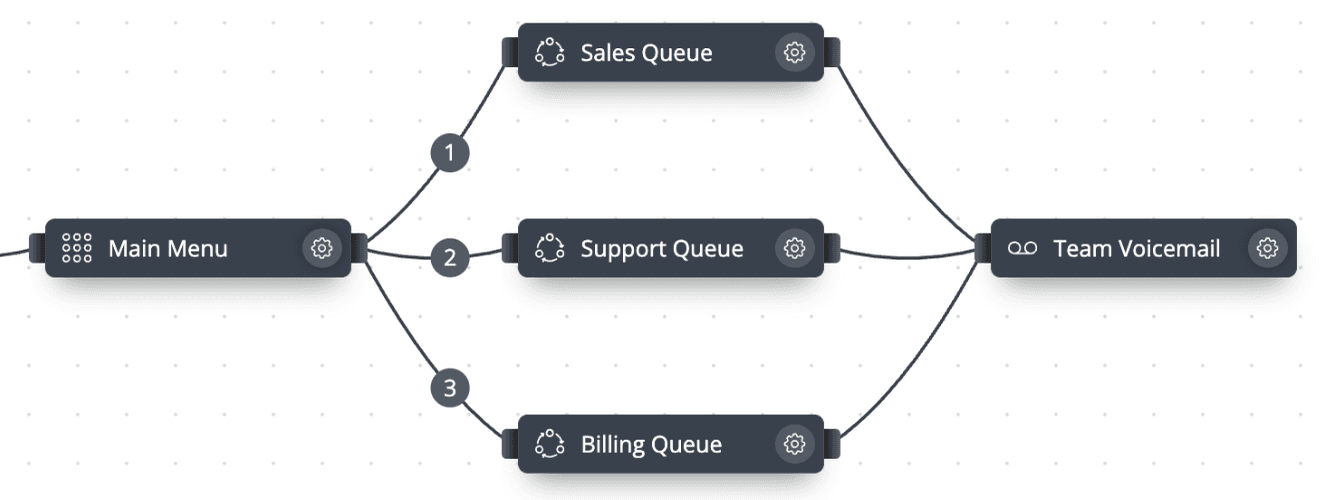
- Step 2: Voice menu: Main Menu
- Press 2: Support queue
- Press 3: Billing queue
- Step 3: Call queuing: Support queue
Round robin, ring all or random distribution, with a hold-message playlist.
- Timeout reached: Voicemail or another team; the call is listed as Lost
- Step 4: Recorded and reviewed
AI summary and sentiment, a score against your support scorecard, and the call logged to your helpdesk or CRM.
Topic routing to support queues
Support and Billing callers reach separate queues, with voicemail as the fallback.
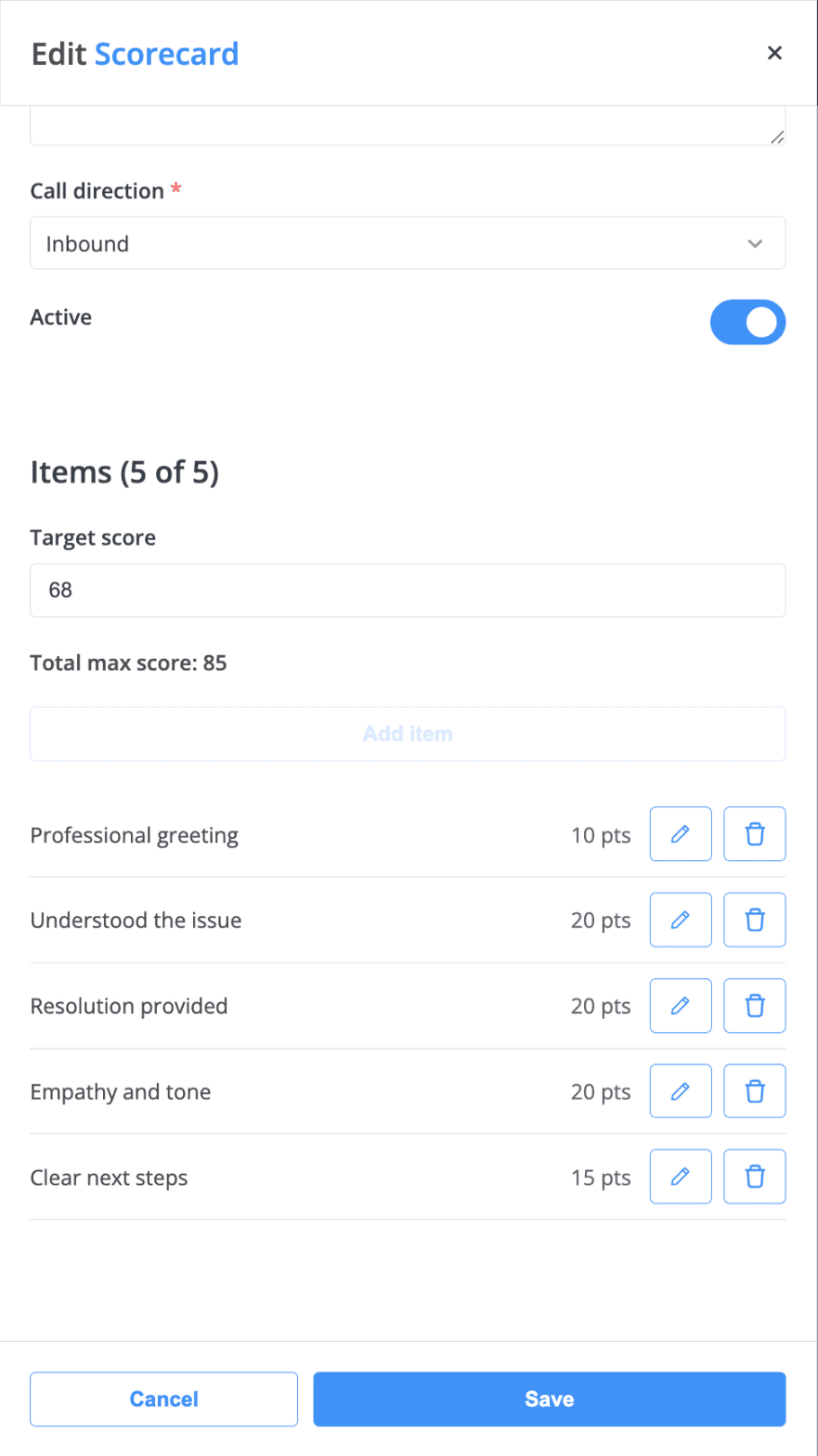
Define what a good support call looks like
Scorecard configuration. The AI uses these criteria when it scores recorded calls.
An example support scorecard: criteria with points and a target score that the AI uses to score recorded calls.
What support teams use
Queues
Round robin, ring all or random distribution, hold playlists and timeouts.
IVR
Voice Menu with text-to-speech prompts and sub-menus.
Voicemail
Delivered to email, Dropbox, Google Drive, OneDrive, FTP or SFTP.
Tags and notes
Support request, Billing question, Follow-up needed and your own tags.
Call recording
Per user and direction, or on demand; stored in phone.systems™ or your own cloud storage.
Zendesk and other CRMs
Call journaling to Zendesk, HubSpot, Salesforce and other major CRM platforms, plus public webhooks.
Capabilities used
The phone.systems™ features this relies on. Each page explains how the capability works.
Call routing
Build call flows in a drag-and-drop editor: voice menus, time routers, ring groups, queues, voicemail, caller routing and an AI agent. Changes apply in real time.
Learn moreCall analytics
Call history with wait time, talk time, status, tags and notes, routing attempts, CSV export, and call and user statistics (ACD, AWT, ASR) in phone.systems™.
Learn moreCall recording
Record calls per user and direction or on demand, review them from call history, analyse them with AI, and keep recordings in phone.systems™ or your own cloud storage.
Learn moreAI call insights
AI call insights for recorded calls: transcript, summary, sentiment, talk-to-listen ratio and key topics in 19 languages, plus AI call scoring. $0.02 per minute.
Learn moreIntegrations
Native CRM integrations with HubSpot, Salesforce, Pipedrive, Zoho CRM, Zendesk and more, plus public webhooks, call journaling and Chrome click-to-call.
Learn more
Frequently asked questions
Does phone.systems™ include wallboards or workforce management?
No. phone.systems™ is a business phone system. Support teams get queues, IVR, call history, statistics, recording and AI call insights, but not wallboards, workforce management, or whisper and barge.
Can I see how many support calls were lost?
Yes. Call History shows every call as Answered, Lost or Resolved, with wait time. Call Statistics and User Statistics show ACD, AWT and ASR, and call history can be exported to CSV.
Does phone.systems™ work with Zendesk?
Yes. Zendesk is one of the native CRM integrations. Call journaling logs calls to Zendesk, and agents can open the caller in Zendesk with View in CRM.
What can a support scorecard measure?
You define the criteria, the points for each and a target score. A support scorecard might check the greeting, whether the issue was understood, whether a resolution was provided, empathy and tone, and clear next steps.
Set up a phone system that fits how you work
Configure numbers, users and call routing in one place, and change them whenever your business changes.