Use case
Never miss a customer call
Build a call flow where every call has a next step, and see the calls that still got away so someone calls back.
The problem
Missed calls rarely come from one cause. A call rings one person who is already on the phone. A department is busy and the caller gives up. Someone calls at 17:05. A new lead calls while the account executive is travelling. Each of these ends the same way: the customer hangs up and the business does not know who called.
Fixing it needs two things: a call flow with a fallback at every point, and a record of lost calls that the team actually works through.
How phone.systems™ handles it
phone.systems™ covers both parts.
Give every call a next step.
- A Queue holds callers with music on hold and distributes calls across the team by round robin, ring all or random. When the queue timeout is reached, the call continues to the next object.
- A Ring Group rings several people in sequence or at the same time, using a ring timeline per destination.
- Voicemail catches calls that no one answers, so the caller can leave details.
- Forwarding sends unanswered calls to a mobile or external number over PSTN or SIP.
- A Time Router with an AI Agent on the closed branch answers calls outside working hours and takes a message.
- Team members answer in the phone.systems™ app on macOS, Windows, Linux, iOS and Android, so a call to the company number reaches them away from the desk.
See which calls were lost. Call History marks each call as Answered, Lost or Resolved, shows wait time, and records who resolved a lost call. Tags such as Follow-up needed and notes keep the callback organised.
The result: an unanswered call moves through a fallback path — queue, then a backup team, then voicemail, a mobile or an AI agent — instead of stopping at the first destination.
A fallback at every step
- Step 1: Virtual number
Your main business number.
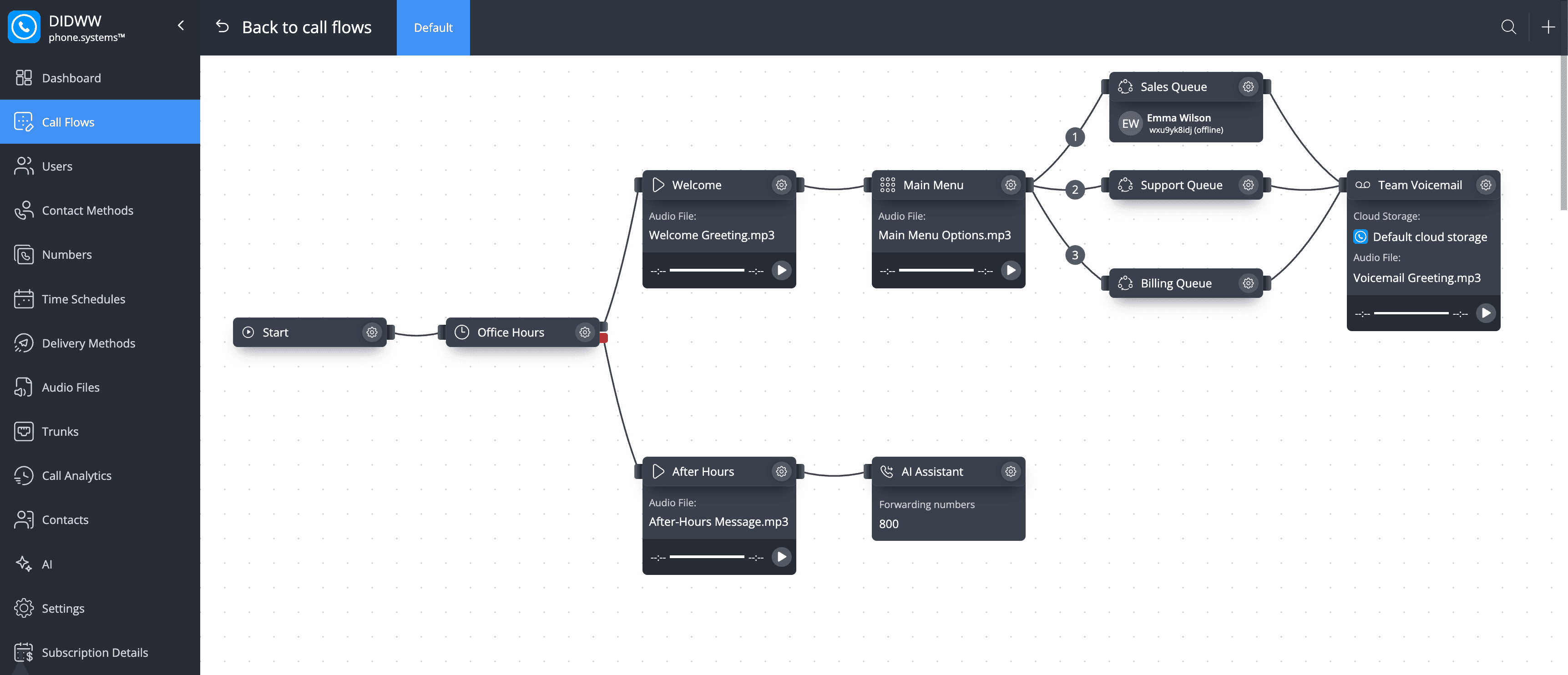
- Step 2: Time router: Office Hours
- Open: Welcome message and Main Menu
- Closed: After-hours message, then an AI agent or voicemail
- Step 3: Voice menu: Main Menu
- Press 1: Sales queue
- Press 2: Support queue
- Press 3: Billing queue
- Step 4: Call queuing: Queues (round robin)
Callers hear the department's hold-message playlist.
- Queue timeout reached: Backup team, then voicemail, a mobile or an AI agent
- Step 5: Call History
Unanswered calls show as Lost until someone resolves them.
The full routing canvas
Call flow with business-hours routing, department queues that fall through to voicemail, and an AI agent on the after-hours branch.
The building blocks
Queue
Round robin, ring all or random distribution, music on hold and a timeout of 5 seconds to 15 minutes.
Ring Group
Sequential or simultaneous ringing with a ring timeline per destination; music on hold or ringback.
Voicemail
The last stop for unanswered calls; files are delivered to email or cloud storage.
Forwarding
Send calls to a mobile or external number over PSTN, or to a SIP destination.
AI Agent
Answers calls outside working hours and takes a message.
Lost-call tracking
Call History shows Lost calls, who resolved them, tags and notes; export to CSV.
How to set it up in phone.systems™
Invite the team in Users
Add users and send app invites so each person can answer on desktop and mobile.
Configure the apps in Contact Methods
Set each user's numbers and what happens when they are unavailable (do nothing or voicemail).
Build queues or ring groups in Call Flows
Choose the distribution strategy and timeout, and attach a hold playlist from Audio Files.
Add fallbacks
Connect each queue's timeout output to Voicemail or Forwarding, and put an AI Agent or Voicemail on the Time Router's closed branch.
Work the lost calls
In Call Analytics, filter Call History for Lost, call back, add a note and mark the call Resolved.
Capabilities used
The phone.systems™ features this relies on. Each page explains how the capability works.
Call routing
Build call flows in a drag-and-drop editor: voice menus, time routers, ring groups, queues, voicemail, caller routing and an AI agent. Changes apply in real time.
Learn moreCall analytics
Call history with wait time, talk time, status, tags and notes, routing attempts, CSV export, and call and user statistics (ACD, AWT, ASR) in phone.systems™.
Learn moreBusiness phone app
The phone.systems™ app for macOS, Windows, Linux, iOS and Android: company caller IDs, directory, presence, transfers and encrypted calls on every device.
Learn more
Frequently asked questions
What happens when nobody in a queue answers?
When the queue timeout (5 seconds to 15 minutes) is reached, the call leaves the queue and continues to the next object in the call flow, for example Voicemail or Forwarding to a mobile.
Can calls ring on mobile phones?
Yes. Team members install the phone.systems™ app on iOS or Android and receive calls to company numbers with push notifications. Calls can also be forwarded to any mobile number over PSTN.
How do I see which calls were missed?
Call History shows every call with the status Answered, Lost or Resolved. Filter for Lost calls, call the customer back, and mark the call Resolved; the resolved-by field shows who handled it.
What is the difference between a queue and a ring group?
A queue holds callers and distributes calls by round robin, ring all or random. A ring group rings a set of destinations on a timeline, in sequence or at the same time. Both can hand unanswered calls to a fallback.
Set up a phone system that fits how you work
Configure numbers, users and call routing in one place, and change them whenever your business changes.