Call routing
Call routing you can see and change
Draw call flows on a canvas and decide where every incoming call goes — by schedule, caller choice, caller number and who is available.
Call routing in phone.systems™ is a drag-and-drop call flow editor in which objects such as time routers, voice menus, ring groups and queues are connected by cables to decide where each incoming call goes.
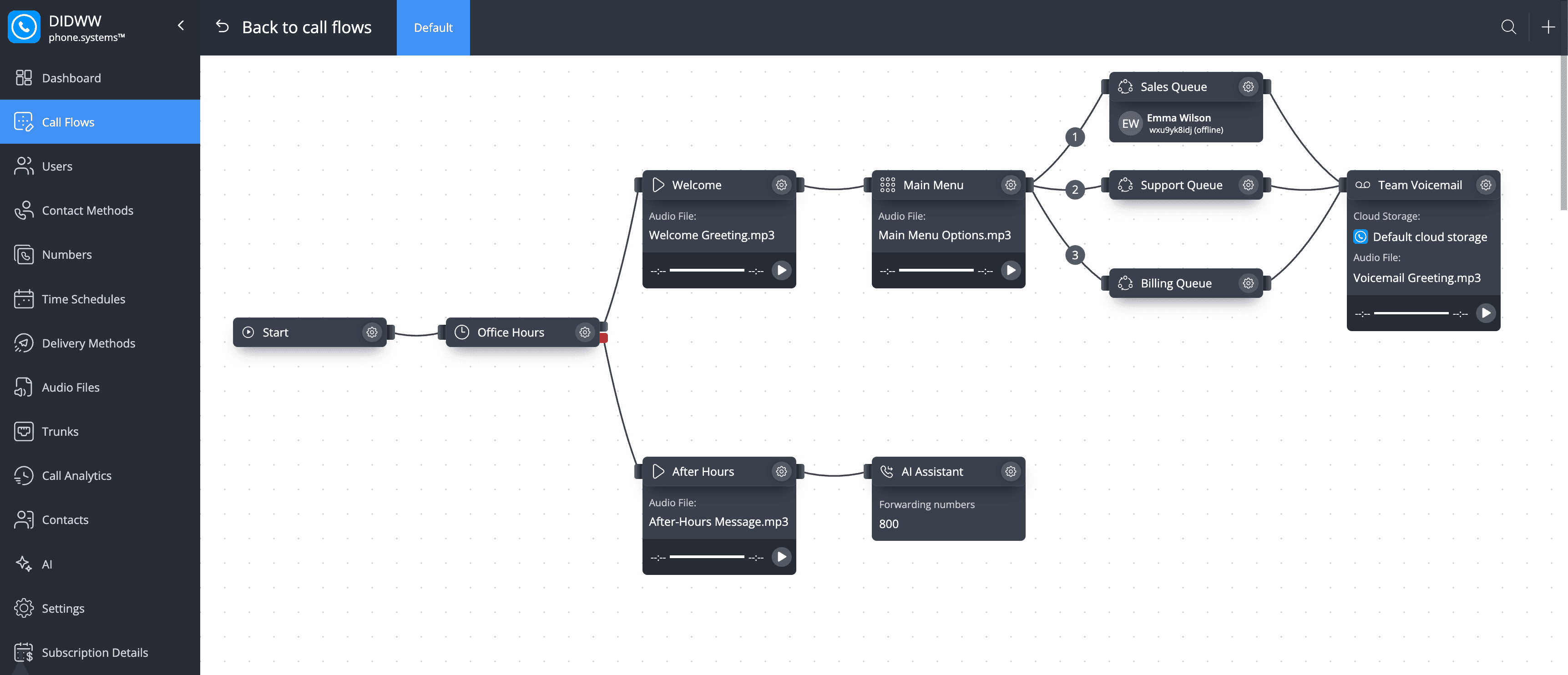
Every call follows the path you draw
Check business hours, offer a menu, ring the right team — and give every branch a next step when nobody answers.
- Virtual number: Incoming call
- Time router: Business hours?
- If Open
- Voice menu
- Call queuing: Team queue
- Voicemail: Voicemail or forwarding
- If Closed
- After-hours message
- Voicemail: AI agent or voicemail
- If Open
The routing decisions that matter
Most business lines are built from a handful of ideas. phone.systems™ makes each one a visual step you can change in real time.
Voice menus send callers to the right team
Press 1 for Sales, 2 for Support, 3 for Billing. Prompts can be recorded, uploaded or generated with text-to-speech.
Build an IVRBusiness hours decide the path
A time schedule holds working hours, time zone and holidays. Calls outside those hours follow their own branch.
Route calls by business hoursTeams and queues share the calls
Ring a team together or in turn, or hold callers in a queue with music until someone is free.
Route calls between departments
No call ends at a dead end
Every routing step can hand an unanswered call to the next one, so a busy team or a closed office never means a lost caller.
- Voicemail takes a message when a queue times out, and can deliver it by email or to file storage.
- Forwarding sends the call to an on-call mobile or another site. See sending unanswered calls to mobile.
- An AI agent answers with your greeting and instructions — for example to take messages after hours. Use the built-in AI Voice Agent or connect your own AI agent with BYOAI.
- Call history shows every routing attempt, so you can see where calls went and adjust the flow.
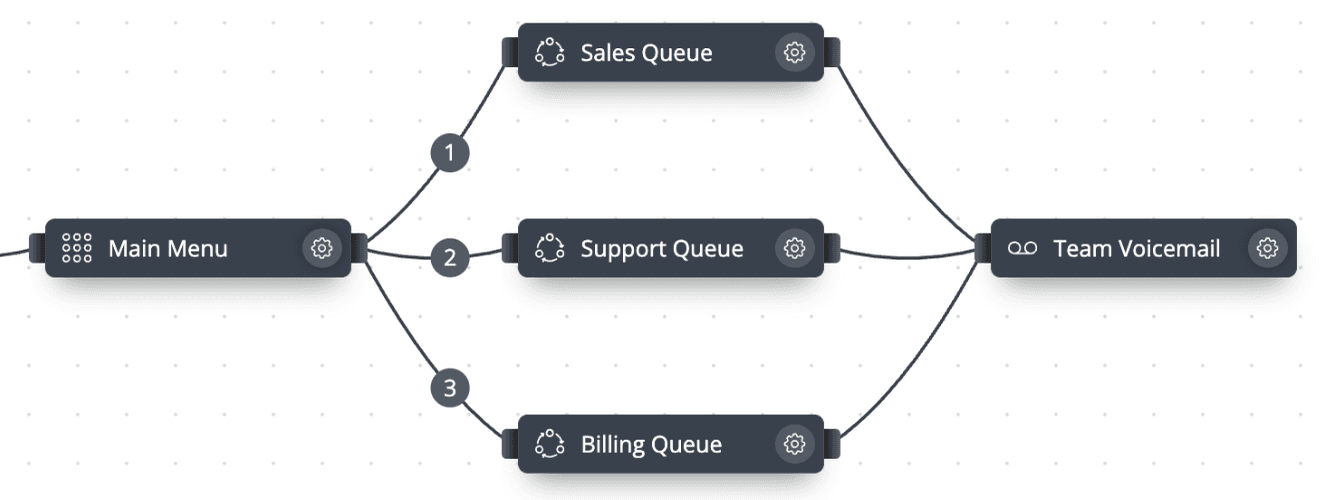
Department routing with a voice menu
A voice menu with keys 1, 2 and 3 leading to Sales, Support and Billing queues, with voicemail as the fallback for unanswered calls.
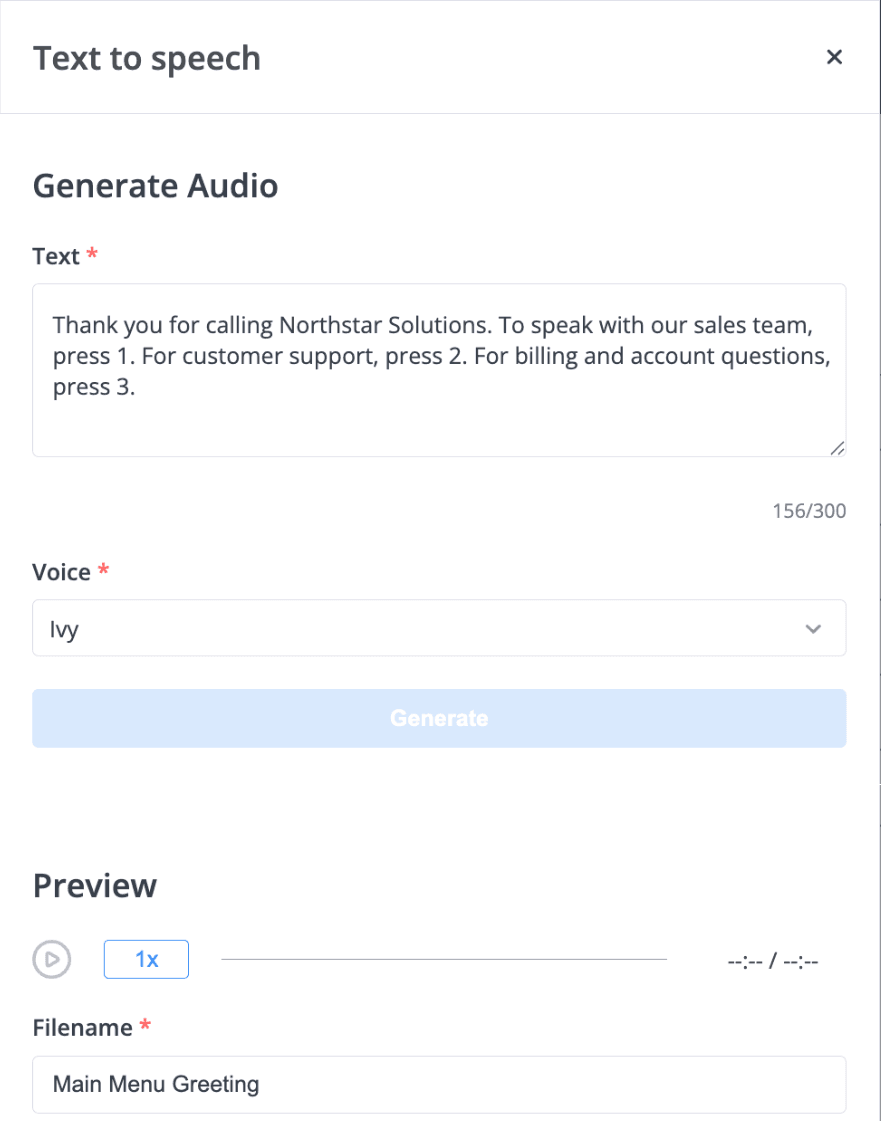
Prompts without a recording studio
Text-to-speech in Audio Files: type a prompt of up to 250 characters, choose a voice and use the result in a voice menu or announcement.
How to set up call routing
Add numbers and users
Numbers appear in the account automatically; add users with their internal numbers and contact methods.
Create schedules and audio
Set up time schedules and upload, record or generate prompts in Audio Files.
Draw the call flow
Drag objects onto the canvas and connect them with cables. Changes apply in real time.
Check call history
Routing attempts in call history show which path each call took, so you can adjust the flow.
All routing objects
Drag objects onto the workspace and connect them with cables. Use multiple workspace tabs for larger setups.
Show all routing objects
- Phone Number and Internal Number
- Entry points for external numbers and internal extensions. External numbers can come from phone.systems™ connectivity or from your own carrier (BYOC).
- Time Router
- Routes by a time schedule: time zone, working days and hours, and holiday exceptions (once, monthly or yearly).
- Voice Menu (IVR)
- Keypress options with prompts that are uploaded, recorded in the browser or generated with text-to-speech. Timeout of 1 second to 2 minutes; 1–11 repeats.
- Ring Group
- A ring timeline per destination, sequential or simultaneous, with music on hold or ringback.
- Queue
- Distributes calls round robin, ring all or random, with music on hold. Connect a voicemail or forwarding as the fallback when nobody answers.
- Caller Router
- Routes calls by the caller's number.
- Blocklist
- Blocks unwanted callers.
- Voicemail
- Takes a message when nobody answers; voicemail can be delivered to email or file storage.
- Fax
- Receives inbound faxes, delivered as PDF.
- Conference
- Conference rooms with an optional PIN.
- Audio Playback
- Plays an announcement anywhere in the flow, such as a welcome or opening-hours message.
- Forwarding
- Forwards calls to external numbers over PSTN or to SIP destinations.
- Notification
- Sends an email notification from a point in the flow.
- Call Recorder
- Records calls from a point in the call flow.
- AI Agent
- The built-in AI Voice Agent with a name, voice, greeting and instructions, for example to take messages after hours, or your own AI agent connected with BYOAI. The built-in agent is priced separately.
What call routing does
Every incoming call to a business number needs a destination. Call routing is the set of rules that chooses it. In phone.systems™ the rules are drawn as a call flow: objects on a workspace canvas, connected by cables, such as check office hours, play the main menu, ring the support queue and go to voicemail if nobody answers.
Because the flow is visual, the person responsible for the phone line can see the whole path a caller takes and change it without a telecom engineer. Changes apply in real time.
How a call moves through a call flow
- A call arrives on a Phone Number object — a DIDWW number, a third-party number or a number from your own carrier.
- phone.systems™ follows the cables from object to object.
- Routing objects — Time Router, Voice Menu, Caller Router — choose the next branch. Answering objects — Ring Group, Queue, Voicemail, Forwarding, AI Agent — connect the call.
- The call and its routing attempts are logged in call history.
Common routing setups
Call routing is the foundation of most phone setups. Common examples include routing calls by business hours, routing calls between departments, building an IVR menu, sending unanswered calls to mobile and letting an AI agent answer after hours.
Frequently asked questions
What is call routing?
Call routing is the set of rules that decides where an incoming phone call goes — for example to a department, a specific person, a menu, voicemail or a mobile number — based on conditions such as time of day or the caller's choice.
Can I route calls differently outside business hours?
Yes. A Time Router object checks a time schedule — time zone, working days and hours, and holiday exceptions — and sends the call to an open or closed branch.
What is the difference between a ring group and a queue?
A ring group rings its destinations on a timeline, one after another or at the same time. A queue holds callers with music on hold and distributes calls round robin, ring all or random.
How do I create voice menu prompts?
Upload an audio file, record it in the browser, or type up to 250 characters and generate it with text-to-speech. Audio files can also be grouped into playlists, for example for hold music.
Do I need technical knowledge to build a call flow?
No. Call flows are built in a visual editor by connecting objects with cables; no scripting is required.
Set up a phone system that fits how you work
Configure numbers, users and call routing in one place, and change them whenever your business changes.