Solution
A business phone system for small businesses
One professional company number, answered by the right person on whatever device they are using, with no hardware and no long-term contract.
Common challenges for small businesses
In a small business, answering the phone is usually part of someone's job rather than the whole of it. That creates familiar problems:
- Calls go to one person's mobile When that person is in a meeting, on holiday or on another call, customers reach nobody.
- Personal and business calls mix Staff give out their own numbers, and the business loses the contact when they leave.
- No after-hours answer Evening and weekend callers hear the phone ring out and do not know when to try again.
- Missed calls go unnoticed Without a shared call history nobody knows which customers are waiting for a callback.
- Traditional phone systems do not fit Desk phones, installation and multi-year contracts are hard to justify for a team of five.
How phone.systems™ handles it
phone.systems™ gives a small business a shared company phone line that runs in the cloud:
- Company numbers from DIDWW in 93 countries (local, national, mobile or toll-free), or keep your existing number with number porting.
- A visual call flow editor. Drag and drop a Time Router for business hours, a Voice Menu for "press 1 for sales", Queues or Ring Groups for the team, and Voicemail as the fallback. Prompts can be generated with text-to-speech, so no studio recording is needed.
- Apps on every device. Staff answer in the phone.systems™ app on macOS, Windows, Linux, iOS or Android, using the company number as caller ID and keeping personal numbers private.
- After-hours handling. An opening-hours message, voicemail, forwarding to an on-call mobile, or an AI Agent that takes messages.
- Call History with Answered, Lost and Resolved statuses, so missed calls get returned.
- Simple pricing. From $9.99 per seat per month, month to month, from one seat. See pricing.
Setup starts with a guided onboarding wizard, and DIDWW provides 24/7 support by chat, email and phone.
A typical small-business setup
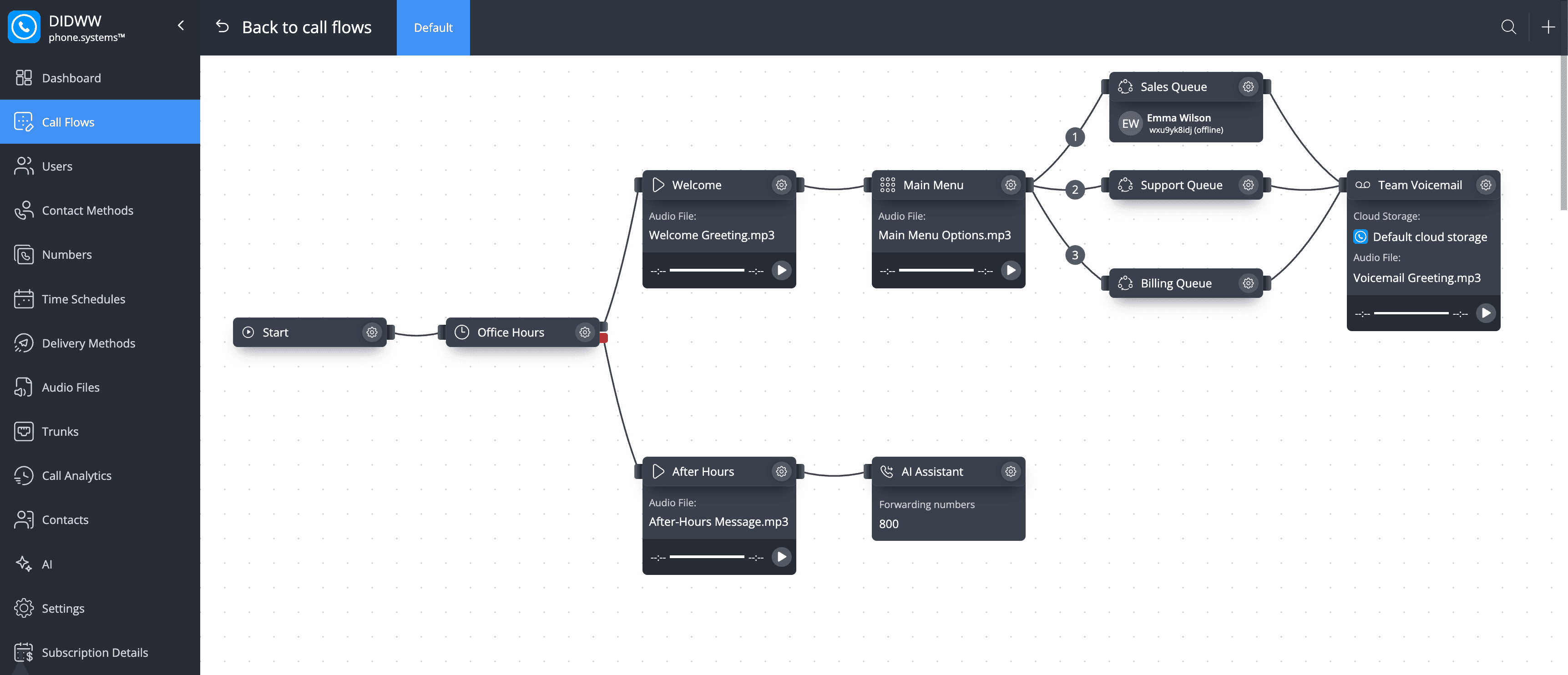
One main business number checks opening hours, presents a short menu and routes callers to the right person or team. If nobody answers, the call continues to voicemail, mobile forwarding or another fallback.
- Step 1: Virtual number
One company number on the website and invoices.
- Step 2: Time router: Office Hours
Mon–Fri 09:00–17:00, public holidays closed.
- Open: Welcome message and Main Menu
- Closed: After Hours message and the After-Hours Assistant AI agent
- Step 3: Voice menu: Main Menu
- Press 1, 2 or 3: Sales, Support or Billing queue
- Step 4: Call queuing
Rings team members' apps in turn (round robin).
- Timeout reached: Team Voicemail
The whole phone system on one canvas
A small-business main line built in the visual call flow editor: opening hours, a menu, team queues and fallbacks.
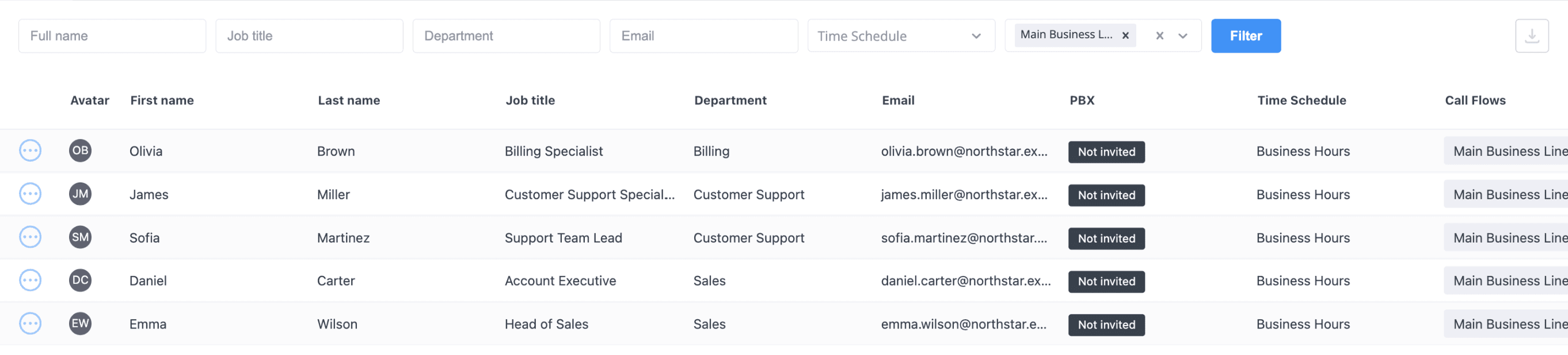
The team
Five users with job titles, departments and schedules. Each seat covers one user with the app on unlimited devices.
What a small business gets
Numbers in 93 countries
Local, national, mobile and toll-free numbers from DIDWW, or port your existing number.
Visual call flows
Business hours, menus, queues and voicemail, connected with drag and drop.
Apps for every device
macOS, Windows, Linux, iOS and Android, with company numbers and presence.
Text-to-speech prompts
Type a greeting or menu prompt and generate the audio in Audio Files.
Call history
Answered, Lost and Resolved calls, tags, notes and CSV export.
Shared phonebook
A company phonebook with CSV import, plus personal phonebooks for each user.
Capabilities used
The phone.systems™ features this relies on. Each page explains how the capability works.
Business phone system
phone.systems™ is a cloud business phone system: numbers in 93 countries, users and extensions, visual call flows, desktop and mobile apps, call history and recording.
Learn moreCall routing
Build call flows in a drag-and-drop editor: voice menus, time routers, ring groups, queues, voicemail, caller routing and an AI agent. Changes apply in real time.
Learn moreBusiness phone app
The phone.systems™ app for macOS, Windows, Linux, iOS and Android: company caller IDs, directory, presence, transfers and encrypted calls on every device.
Learn moreCall analytics
Call history with wait time, talk time, status, tags and notes, routing attempts, CSV export, and call and user statistics (ACD, AWT, ASR) in phone.systems™.
Learn more
Frequently asked questions
How much does phone.systems™ cost for a small business?
From $9.99 per seat per month, month to month, from one seat, and less per seat as your team grows. See the pricing page for the full breakdown.
Can a small business use phone.systems™ without an IT team?
Yes. Numbers, users and call flows are managed in a web admin, call flows are built visually, and a guided onboarding wizard helps with the first setup. Support is available 24/7 by chat, email and phone.
Can staff use their own mobile phones for business calls?
Yes. Staff install the phone.systems™ app on iOS or Android and make and receive calls with the company number, keeping their personal number private.
Do we need desk phones?
No. The apps cover desktop and mobile. If you prefer desk phones, any SIP IP phone can be connected with a SIP account.
Set up a phone system that fits how you work
Configure numbers, users and call routing in one place, and change them whenever your business changes.